

When a test fails against feint, the first question is not "why", it is "where". The problem is the host, the emulator or your client, and four commands separate those three cases in under a minute. This page takes them in the order of what they cost.
What you will get
By the end of this page, you will locate a failure in four commands:
doctor for the host, status for the emulator, logs and the call
log for what your client actually sent.
- Pick the command that answers the question you are asking.
- Read a diagnosis report and sort the warning from the blocker.
- Spot a configuration able to reach the real cloud anyway.
- Wire the exit codes into a continuous integration script.
Which command for which question
Each command answers one question, and mixing them up wastes time. This table is the shortcut worth remembering.
| Your question | The command | What it looks at |
|---|---|---|
| Can my machine run this? | feint doctor | the port, the runtime, the clients, the SSH traps |
| Is it running, and since when? | feint status | the process, the inventory, the driven routes |
| What did the emulator do at start-up? | feint logs | the detached process's output |
| What exactly did my client send? | /_feint/trace | the HTTP exchanges, method, path, status |
| May I continue in a script? | feint wait | the wait that fails outright |
feint doctor: what your machine can deliver
The command does not query the emulator, it queries the host. It therefore runs before anything starts, and its value is turning a future, obscure failure into a line you can read right now.
feint doctor 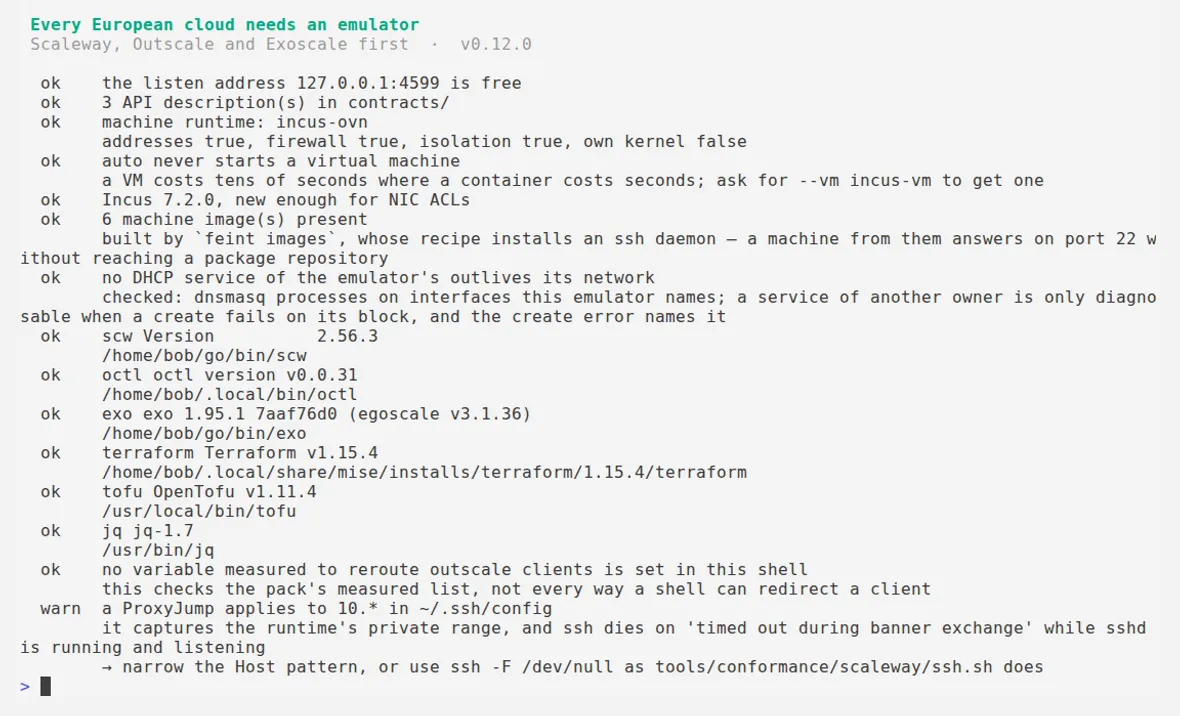
Three families of lines stand out, and their severity is not the same.
Capability lines state what the machine runtime can do, and they read as
facts rather than as a score: addresses true, firewall true, isolation true, own kernel false. The last value explains why a kernel module test will fail in a
container: it shares the host's kernel. The same capabilities are queryable by a
script on /_feint/health.
Tooling lines list the official clients found, with their version and
their path. That is what explains, one time in two, why a test script fails on a
colleague's machine: it is not the emulator, it is an octl missing from PATH.
Warnings block nothing but announce a likely failure. The most useful is the
ProxyJump one: a rule matching 10.* in your ~/.ssh/config captures the
runtime's private range, and the connection dies on timed out during banner exchange while the SSH server is running. Without that line, the search takes
an hour.
The trap doctor finds before you do
A run presented as local can still reach the real cloud. That is the most
important limit of any API emulator, and it is not hypothetical: Scaleway's
Terraform provider hardcodes s3.<region>.scw.cloud for Object Storage, so
those calls leave for the provider with whatever credentials the run holds.
Run from your configuration's directory, feint doctor reads your Terraform
files and says so before the apply:
warn this Terraform configuration can reach the real scaleway cloud → this configuration carries scaleway_object_* (Object Storage): the Terraform provider hardcodes https://s3.<region>.scw.cloud for that product, so those calls leave for the real cloud with whatever credentials the run holdsOn a configuration with no such resource, the same command answers, and the second line matters as much as the first:
ok no known escape signature in the 1 Terraform file(s) here this checks the measured list (docs/limits.md), not every path a client could composeThe check covers a measured list, not every possible path. A client can always compose an address outside the emulated perimeter itself. What this line gives you is coverage of the known cases, which is a lot, and it claims nothing more. The other boundaries of this kind are gathered in What feint proves.
feint status: what is running, and what a client drove
The command answers in three blocks, read top to bottom.
feint statusrunning on 127.0.0.1:4599 (pid 3861417, since 2026-08-29T17:31:22Z) resources 0 machines none
provider routes driven by a client scaleway 193 0 exoscale 104 0 outscale 100 0The driven by a client column unblocks the most situations. It counts the
routes a real client actually called since start-up. A zero while you have just
run terraform apply means your client is not talking to this emulator: wrong
address, wrong port, or environment variables set in another shell. The problem is
on the client side, and you established it without reading a log line.
The machines line says whether a runtime is wired in. At none, the
emulator is a control plane: it answers, and nothing runs. That is the
default mode, and it is what lets tests run on a runner with nothing
installed.
The logs, and the call log
These are two different sources, and confusing them means looking in the wrong place.
feint logs shows the detached process's output, so what the emulator did
by itself: the routes mounted per pack, the listen address, the version.
feint logs | tail -6feint v0.13.0 listening on 127.0.0.1:4599 scaleway 193 routes outscale 100 routes exoscale 104 routes machines none page http://127.0.0.1:4599/_feint/uiThe call log shows what your client sent, and it is the source that settles a question of operation naming:
curl -s localhost:4599/_feint/trace \ | jq -r '.exchanges[] | "\(.method) \(.path) \(.status) \(.operation // "no route")"'GET /v2/instance-type 200 exoscale/v2.list-instance-typesGET /v2/zone 200 exoscale/v2.list-zonesGET /v2/quota 200 exoscale/v2.list-quotasA line marked no route is the most direct diagnosis there is: the client
called a path nobody serves. The same information is readable on screen on the
introspection page, described in Measuring
fidelity.
Exit codes, and the verb that blocks the way
This is the part that matters in a script, and it rests on a deliberate distinction.
| Code | Meaning |
|---|---|
0 | all good |
1 | error |
2 | drift detected, for the fidelity commands |
feint status always exits 0, including when nothing runs, because a stopped
emulator is a fact rather than a failure. The verb that blocks the way is
feint wait:
feint wait --timeout 5sfeint: 127.0.0.1:4599 did not answer within 5sThe exit code is then 1, and that is what fails a pipeline step instead of
letting the rest run against a missing emulator. Using status instead of
wait produces the opposite error: the pipeline carries on and breaks fifteen
lines later, on an unrelated message. The correct form is detailed in Test in a
pipeline.
Symptom, cause, fix
| Symptom | Likely cause | Fix |
|---|---|---|
terraform apply hangs then blames the provider | The endpoint points at a silent port | feint status, then fix endpoint in the configuration |
driven by a client stays at 0 | The client talks to another address | Re-run eval "$(feint env <provider>)" in this shell |
feint start refuses to start | An emulator already holds the port | feint stop, or feint status to see which one |
SSH dies on banner exchange | A ProxyJump captures the private range | Narrow the Host pattern, or ssh -F /dev/null |
warn no contracts/ directory here | Responses are not checked against the API descriptions | Run from the repository, or pass --contracts <dir> |
| A test passes then the next one fails | A fault rule stayed armed | curl -X DELETE localhost:4599/_feint/faults |
An operation answers 404 for no clear reason | The pack declines that operation | Check the response's X-Feint-Not-Emulated header |
Key takeaways
- Locate before explaining: host, emulator or client, in that order.
doctorqueries the machine, not the emulator, and runs before start-up.- Run in a Terraform directory,
doctorflags configurations able to reach the real cloud. driven by a clientat zero means your client is talking somewhere else.statusalways exits 0; the verb that fails a pipeline iswait.X-Feint-Not-Emulatedtells a declined operation from a missing resource.