

Give feint a runtime and a server created through the API becomes a real machine, on a real bridge, carrying the address the API published, and you open an SSH session inside it. That is what separates an emulator from a mock server: the block you asked for is the block you get, a security group really closes a port, and the machine answers. This page compares the four modes, gives the Incus and OVN on Debian 13 procedure, and walks the SSH path on all three providers.
What you will get
By the end of this page, a machine created through the API will really run on your host, will carry the address the API published, and you will open an SSH session into it on all three providers.
- Choose the machine mode according to what you want to prove.
- Install Incus and OVN on Debian 13, OVN wiring included.
- Check that the machine carries the address the API published.
- Open an SSH session on emulated Scaleway, Outscale and Exoscale.
Real machines, on request
By default feint is a control plane: it answers, and nothing runs. Give it a runtime and a created server becomes a real container or virtual machine, on a real bridge, carrying the address the API published. That is the difference between an emulator and a plain mock server.
The four modes do not deliver the same thing, and only one difference really matters:
--vm | Machines | Addresses | Firewall | Inter-VPC isolation | Own kernel | Requires |
|---|---|---|---|---|---|---|
off (default) | no | no | no | no | no | nothing |
incus | yes | yes | yes | no | no | Incus 6.0.4+ |
incus-vm | yes | yes | yes | no | yes | Incus + KVM |
incus-ovn | yes | yes | yes | yes | no | Incus + OVN |
Isolation is the only capability whose verdict changes with the mode. Two private networks belonging to two different VPCs must not reach each other. In bridge mode they do, and the cause is documented by the runtime itself: traffic between managed bridges on the same host is routed directly. An OVN network is a logical network with its own router, so the separation comes from the topology rather than from a rule.
Rather than guessing, ask the emulator what its mode can prove:
feint start --vm incuscurl -s localhost:4599/_feint/health | jq -c '.capabilities'{"machines":true,"addresses":true,"firewall":true,"isolation":false,"own_kernel":false}The same call in --vm incus-ovn returns "isolation":true. That
declaration is meant to be read by your tests: a suite comparing a hardcoded
mode name has to be edited on every change, a suite reading the capabilities
keeps working.
How to install Incus and OVN on Debian 13
Debian 13 is the simplest distribution for this mode, and the procedure has
three parts: the repository, the packages, the OVN wiring. The last one is what
nobody guesses, and without it incus network create --type=ovn fails with an
error naming neither the cause nor the missing setting.
A word on choosing the repository, because it is debatable. Debian 13 "trixie"
packages Incus 6.0.4, exactly the floor below which access control lists on
an interface are refused. The distribution package is therefore enough, unlike
Ubuntu 24.04, which ships 6.0.0 and will not move. The Zabbly repository,
published by Incus' maintainer, brings the recommended 7.2 series, the one the
project's measurements were made on. On my Debian 13 VM, apt-cache policy incus
does print 6.0.4-2+deb13u8 before the repository is added.
-
Install the prerequisites and fetch the repository key into its own keyring. A key placed in
/etc/apt/keyringssigns only the repository that names it, where the system store would count for everything.Terminal window apt-get updateapt-get install -y --no-install-recommends ca-certificates curl gpg uidmapmkdir -p /etc/apt/keyringscurl -fsSL https://pkgs.zabbly.com/key.asc -o /etc/apt/keyrings/zabbly.ascgpg --show-keys --with-fingerprint /etc/apt/keyrings/zabbly.ascCheck the fingerprint printed before going further: it must be
4EFC 5906 96CB 15B8 7C73 A3AD 82CC 8797 C838 DCFD, forZabbly Kernel Builds. That is the one moment where you decide whom you trust. -
Declare the repository, deriving the suite and the architecture from the machine rather than hardcoding them.
Terminal window cat > /etc/apt/sources.list.d/zabbly-incus.sources <<EOFEnabled: yesTypes: debURIs: https://pkgs.zabbly.com/incus/stableSuites: $(. /etc/os-release && echo "$VERSION_CODENAME")Components: mainArchitectures: $(dpkg --print-architecture)Signed-By: /etc/apt/keyrings/zabbly.ascEOFOn Debian 13,
Suitesistrixie. Nocurl | shin this procedure: every file is written to disk, and the key is verified before a single package arrives. -
Install Incus, OVN and Open vSwitch. Incus comes from Zabbly, the OVN packages from Debian.
Terminal window apt-get updateapt-get install -y --no-install-recommends \incus incus-client ovn-central ovn-host openvswitch-switchImmediate check:
incus --versionmust answer7.2andovn-nbctl --versionovn-nbctl 25.03.0on an up-to-date trixie. -
Start the services, then wait. The systemd units return before the OVN databases are listening, and a command run in that window fails for no apparent reason.
Terminal window systemctl enable --now openvswitch-switch ovn-central ovn-hostwhile [ ! -S /run/ovn/ovnnb_db.sock ]; do sleep 1; done -
Tell Open vSwitch where the southbound database is. That is half the wiring, the half connecting the switch to the OVN control plane.
Terminal window ovs-vsctl set open_vswitch . \external_ids:ovn-remote=unix:/run/ovn/ovnsb_db.sock \external_ids:ovn-encap-type=geneve \external_ids:ovn-encap-ip=127.0.0.1 -
Initialise Incus, then give the uplink bridge the range the OVN networks will carve out of it.
Terminal window incus admin init --minimalincus network set incusbr0 ipv4.address=10.108.0.1/24incus network set incusbr0 \ipv4.dhcp.ranges=10.108.0.10-10.108.0.99 \ipv4.ovn.ranges=10.108.0.100-10.108.0.199The address is set in a separate command from the ranges: those are validated against the bridge's current address, and
incus admin init --minimalpicks one at random. Withoutipv4.ovn.ranges, creating an OVN network is refused with a message blaming the network rather than the bridge. -
Verify with a real network, not with the list of installed packages.
Terminal window incus network create ovntest --type=ovn network=incusbr0incus network delete ovntestNetwork ovntest createdvalidates the whole wiring. It is the only check that proves anything: packages installed but badly wired pass every other one.
Do not disable AppArmor. The temptation exists, because the OVN project's own continuous integration turns AppArmor off before its system tests. That workaround targets binaries built from source, outside the paths the packaged profiles cover. A package installation ships the profiles it needs: on the test VM, Incus, OVN and Open vSwitch all run with AppArmor active. Turning off a mandatory access control to run a testing tool is a bad trade.
The final verdict is not read in apt, but in the declared capability:
feint doctor --vm autofeint start --vm autocurl -s localhost:4599/_feint/health | jq -c '.machines, .capabilities.isolation'On a freshly installed Debian 13 VM, doctor reports machine runtime: incus-ovn with isolation true, and the health API confirms
"incus-ovn" then true. A false value means OVN is absent, or present
but not wired.
Does the machine really carry the published address?
Yes, and it takes three commands to check. Create a private network on a chosen block, attach a server to it, start it, then ask the runtime, not the emulator, what the machine carries.
# the block you asked for is the block you getcurl -s -X POST "http://127.0.0.1:4599/vpc/v2/regions/fr-par/private-networks" \  -H 'Content-Type: application/json' \  -d '{"name":"lab","subnets":["10.51.0.0/24"]}' | jq -c '{id, subnet: .subnets[0].subnet}'
# what the API publishescurl -s "http://127.0.0.1:4599/ipam/v1/regions/fr-par/ips" | jq -r '.ips[0].address'
# what the machine carries, seen from the runtimeincus exec "feint-scw-<server-id>" -- ip -4 -o addr show
On my workstation, IPAM publishes 10.51.0.2/24 and the container carries
10.51.0.2/24: the two addresses match. The same attempt in --vm incus-ovn gives 10.52.0.2/24 on both sides. The machine created is called
feint-scw-<server identifier>, which makes it easy to find.
Everything the emulator creates is labelled, and feint clean removes exactly
those objects, without touching the rest of your host:
feint clean --vm incusremoved 1 machine(s), 1 network(s), 1 rule set(s)If Incus is not installed on your machine yet, the site's Incus section covers the setup.
How to open an SSH session on an emulated machine
The public address the API publishes is really routed, and you can SSH into it on all three providers. The previous section was about the private plane, the subnet's address; this one is about the public plane, the one you open a session through. This is where emulation stops being a matter of JSON answers: you register a key through the provider's API, you create a server, and you open a session on it with the ordinary SSH client, exactly as on the real cloud.
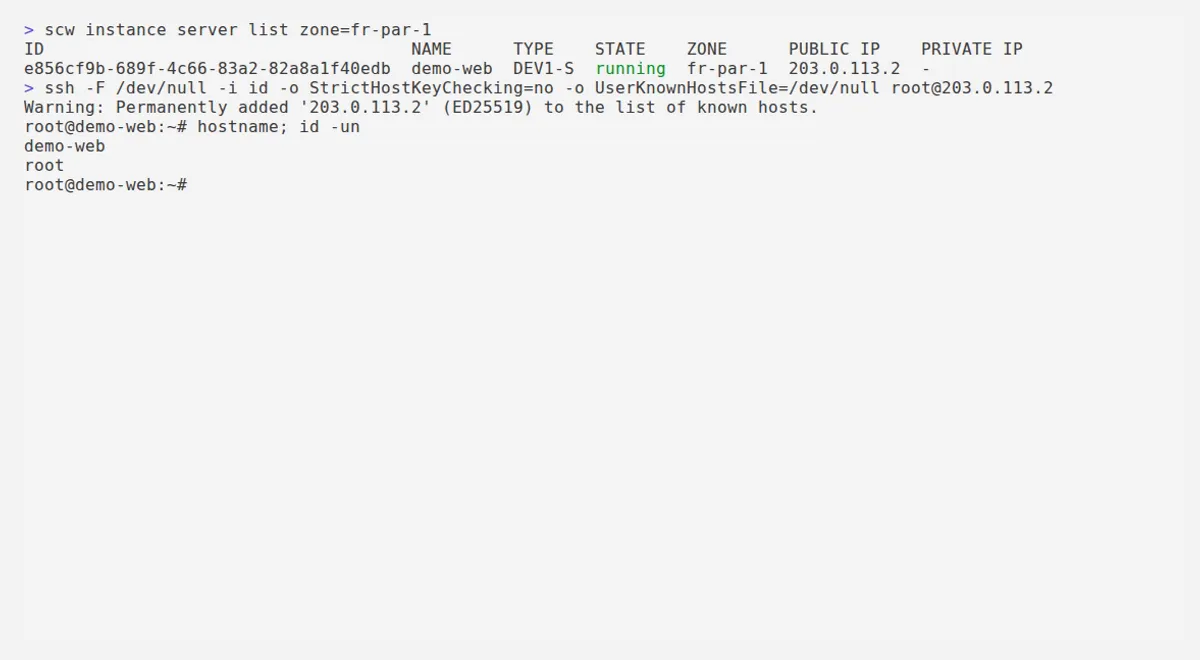
Each provider publishes its addresses in its own documentation block, and that
detail has a precise reason: two clouds emulated on the same machine must never
route the same /32.
| Provider | Published block | Standard | Default user |
|---|---|---|---|
| Scaleway | 203.0.113.0/28 | TEST-NET-3 | root |
| Outscale | 198.51.100.0/28 | TEST-NET-2 | outscale |
| Exoscale | 192.0.2.0/28 | TEST-NET-1 | whatever the template declares |
Those ranges are reserved for documentation by RFC 5737: they are
routable nowhere on the Internet, which makes them exactly the right choice for
a public address existing only on your machine. The path below needs an active
machine runtime, so --vm incus at minimum.
ssh-keygen -t ed25519 -N '' -C feint-lab -f ./ideval "$(feint env scaleway)"
# the key goes through the IAM API, as on the real Scalewayscw iam ssh-key create name=feint-lab public-key="$(cat ./id.pub)"
# a flexible address, then the server carrying itip_id=$(scw instance ip create zone=fr-par-1 -o json | jq -r '(.ip // .).id')srv=$(scw instance server create name=ssh-lab type=DEV1-S zone=fr-par-1 ip="$ip_id" -o json | jq -r .id)scw instance server start "$srv" zone=fr-par-1
# the address the API publishes is the one you connect toip=$(scw instance server get "$srv" zone=fr-par-1 -o json | jq -r '.public_ips[0].address')ssh -F /dev/null -i ./id -o UserKnownHostsFile=/dev/null -o StrictHostKeyChecking=no "root@$ip"
Once inside the machine, the interface carries the published address, and it alone:
ssh-labrooteth0 203.0.113.2/32One address only, as on the real cloud. Earlier versions carried two: the upstream images contain no SSH daemon, measured on the four public images tested, so the machine installed one on first boot, which required Internet egress, therefore address translation, therefore a second network. The emulator now builds its own images with the daemon already present, and that second address is gone. A real Scaleway account and a real Exoscale account were measured to settle it: one address each, never two.
feint images --check ok almalinux/9 9d351a392b89 ok alpine/3.21 b2f8e0301664 ok debian/12 7bf813f9e3ea ok ubuntu/22.04 41015360bee3 ok ubuntu/24.04 3684ba893a51
every machine image is presentfeint images builds the five images, --check reports what is missing and
exits 2, and feint doctor names them without ever building anything: a build
starts a container and takes several minutes, which this tool prefers to ask for
rather than trigger.
The official client is octl, and the path goes through its generic form
octl iaas api <Action>: the shorthand aliases do not yet cover registering a
public key from a file.
eval "$(feint env outscale)"
octl iaas api CreateKeypair --KeypairName=feint-lab --PublicKey="$(cat ./id.pub)"
octl iaas api CreatePublicIp --output json > ip.jsonip_id=$(jq -r '.PublicIpId' ip.json)public=$(jq -r '.PublicIp' ip.json)
octl iaas api CreateVms --ImageId=ami-fe1a7001 --VmType=tinav6.c1r1p2 \  --KeypairName=feint-lab --output json > vms.jsonvm=$(jq -r 'if type=="array" then .[0] else . end | .VmId' vms.json)
octl iaas api LinkPublicIp --PublicIpId="$ip_id" --VmId="$vm"
ssh -F /dev/null -i ./id -o UserKnownHostsFile=/dev/null -o StrictHostKeyChecking=no "outscale@$public"
The jq filter deserves an explanation, because it differs from the one you
would write for the older client: octl unwraps the envelope of the response.
CreatePublicIp returns {"PublicIp": "198.51.100.1", "PublicIpId": "eipalloc-…"} directly, with no intermediate PublicIp level, and CreateVms
returns an array rather than a Vms object. Hence the if type=="array"
handling both shapes.
The fingerprint returned by CreateKeypair is the one ssh-keygen
computes, and ReadVms republishes the same address CreatePublicIp handed
back: that is what the conformance suite checks before even trying to connect.
{"VmId":"i-97fd3222","PublicIp":"198.51.100.1","KeypairName":"feint-lab"}The user is not a property of the cloud but of the template, which declares it
in its default-user field. Reading it rather than assuming it is the only
correct way to proceed.
eval "$(feint env exoscale)"
exo compute ssh-key register feint-lab ./id.pubtpl=$(exo -O json compute instance-template list | jq -r '.[0].name')type=$(exo -O json compute instance-type list | jq -r '"\(.[0].family).\(.[0].name)"')
exo compute instance create ssh-lab --zone "$EXOSCALE_ZONE" \  --template "$tpl" --instance-type "$type" --ssh-key feint-lab
# the address you connect to is an attached elastic IPinst=$(exo -O json compute instance list | jq -r '.[] | select(.name=="ssh-lab") | .id')exo -O json compute elastic-ip create --description feint-labeip=$(exo -O json compute elastic-ip list | jq -r '.[0].ip_address')exo compute instance elastic-ip attach "$inst" "$eip"
ssh -F /dev/null -i ./id -o UserKnownHostsFile=/dev/null -o StrictHostKeyChecking=no "debian@$eip"
On the emulated catalogue's Debian 12 template, default-user is debian, and
the elastic IP lands on 192.0.2.1.
What the host can reach depends on the mode
A private subnet address answers from the host in bridge mode, but not under OVN, and the emulator declares it rather than leaving you to guess. The cause is topological: the logical router separating two VPCs also translates connections coming from the host on the way back.
curl -s localhost:4599/_feint/health | jq -c '.capabilities'{"machines":true,"addresses":true,"firewall":true,"isolation":false,"own_kernel":false,"private_from_host":true}In --vm incus-ovn, the same request returns "isolation":true and
"private_from_host":false. The two capabilities therefore vary in opposite
directions, and that is the trade-off to know: the mode that truly isolates
two VPCs is the one from which your workstation cannot reach an internal address.
The public plane stays reachable in both modes, which is precisely why the SSH
paths above go through a public address rather than a private one.
Key takeaways
- By default feint runs no machines:
offmode is a control plane, and that is what CI runs. - Only
--vm incus-ovnisolates two VPCs, at the cost of a private address the host no longer reaches. - The machine carries the published address, verifiable from the runtime rather than from the emulator.
- An SSH session opens on all three providers, each on its own documentation address block.
feint cleanremoves only what the emulator created, the rest of the host is never touched.