

Before creating your first workflow, let us take the time to understand what a CI/CD pipeline is, how GitHub Actions works, and above all why security has to be your priority from day one.
What is a CI/CD pipeline?
Picture yourself working on an application. On every code change, you have to:
- Check that the code compiles and that the tests pass
- Build the application (an executable, a Docker image, and so on)
- Deploy it to an environment (staging, production, and so on)
Doing all of that by hand is slow, repetitive and error-prone. A CI/CD pipeline automates those steps.
What does CI/CD stand for?
- CI (Continuous Integration): on every change, the code is tested and integrated automatically. Bugs surface very early.
- CD (Continuous Delivery/Deployment): validated code is automatically prepared for, or pushed to, the target environments.
The idea is small frequent changes, validated automatically, rather than large risky releases once a month.
GitHub Actions: the engine behind your pipelines
GitHub Actions is the CI/CD service built into GitHub. When something happens on your repository (a push, a pull request, a release), GitHub Actions can run tasks automatically.
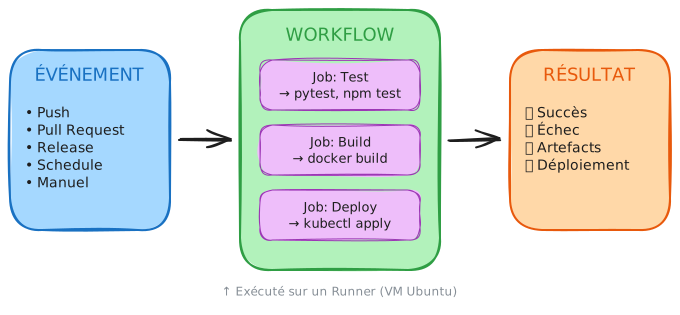
Concretely:
- An event triggers the pipeline (you push code)
- A workflow defines what to do (test, build, deploy)
- A runner executes the tasks (a virtual machine provided by GitHub)
- A result comes out (success or failure, artifacts, a deployment)
Why security comes before everything else
Attacks on CI/CD pipelines have exploded. In March 2025, a compromised GitHub
action (tj-actions/changed-files) made it possible to exfiltrate the secrets
of thousands of repositories within hours. The attack covered every version
from v1 to v45, including the ones considered "stable".
The problem with mutable tags
When you write actions/checkout@v4 after uses:, you are trusting a Git
tag. But a tag can be moved at any time by the maintainer.
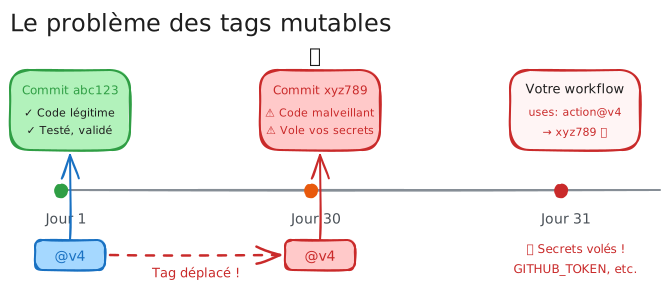
Here is what can happen:
- You use
actions/checkout@v4in your workflow - The action works perfectly for months
- An attacker compromises the maintainer's account
- They move the
v4tag to point at malicious code - Your next pipeline runs the attacker's code, without you changing anything at all
That is exactly what happened with tj-actions/changed-files.
The fix: pin by SHA
A SHA (Secure Hash Algorithm) is the cryptographic fingerprint of a commit. Unlike a tag, it is immutable: it cannot be changed without changing the hash itself.
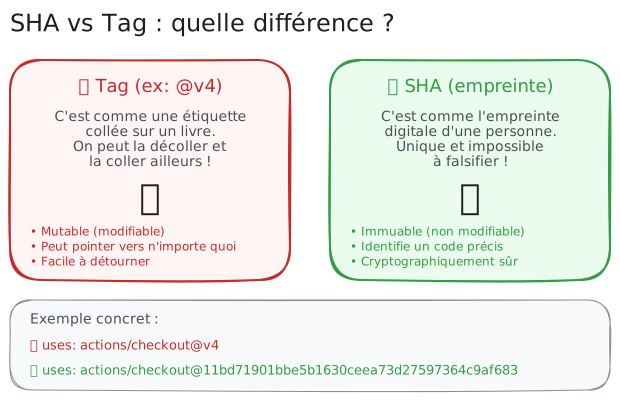
# ❌ DANGEROUS: a mutable tag- uses: actions/checkout@v4
# ✅ SECURE: a pinned SHA- uses: actions/checkout@3d3c42e5aac5ba805825da76410c181273ba90b1 # v7.0.1
The # v7.0.1 comment keeps a readable trace of the version behind the
fingerprint, without which nobody could tell what is pinned. Renovate and
Dependabot update those SHAs automatically and rewrite the comment along
with them, so it stays accurate after every bump.
The three security reflexes
Adopt these practices from your very first workflow.
1. Pin the actions by SHA
# Always use the full SHA, never the tag- uses: actions/checkout@3d3c42e5aac5ba805825da76410c181273ba90b1 # v7.0.12. Declare minimal permissions
# By default, a workflow has FAR too many permissions# Restrict them explicitly to what is strictly neededpermissions: contents: read # Read-only on the code3. Never print a secret into the logs
# ❌ DISASTER: the secret shows up in the logs- run: echo "Token: ${{ secrets.API_TOKEN }}"
# ✅ Secrets stay masked when they are used correctly- run: curl -H "Authorization: Bearer ${{ secrets.API_TOKEN }}" https://api.example.comYour first workflow
Now that you understand the stakes, here is a secure workflow for a Python API:
name: CI Pipeline
# Minimal permissions, declared at workflow levelpermissions:  contents: read
on:  push:    branches: [main]  pull_request:    branches: [main]
jobs:  test:    runs-on: ubuntu-24.04    steps:      # Actions pinned by SHA      - uses: actions/checkout@3d3c42e5aac5ba805825da76410c181273ba90b1 # v7.0.1
      - name: Install Python        uses: actions/setup-python@5fda3b95a4ea91299a34e894583c3862153e4b97 # v7.0.0        with:          python-version: '3.12'
      - name: Install the dependencies        run: pip install -r requirements.txt
      - name: Run the tests        run: pytest
This workflow:
- declares
permissions: contents: readto limit what it can reach; - uses SHAs instead of tags for its actions;
- does exactly what it is meant to do, testing the code.
The key concepts
Before going further, here is the essential vocabulary:
| Term | Definition | Example |
|---|---|---|
| Workflow | A YAML file describing your pipeline | .github/workflows/ci.yml |
| Job | A group of tasks running on the same machine | test, build, deploy |
| Step | An individual task inside a job | "Install Python", "Run pytest" |
| Runner | The machine (VM) that executes the job | ubuntu-24.04, windows-2025 |
| Action | A reusable component, like a library | actions/checkout, actions/setup-python |
| SHA | The unique, immutable identifier of a commit | 3d3c42e5aac5ba805825da76410c181273ba90b1 |
What you will learn
This Foundations module gives you the basics to build and understand your first workflows safely:
Next steps
You now understand what a CI/CD pipeline is and why it helps, how GitHub Actions fits into your development workflow, why security belongs in the picture from day one, and the three essential reflexes: SHA, permissions, secrets.
- What is a workflow?: the file structure, and your first working pipeline.
- Security: the basics: how to apply the three reflexes concretely.
- Securing GitHub Actions: the full security module, once the basics are in place.