

You have spent 3 hours setting up a perfect CI/CD pipeline. Build, tests,
deployment. You start the workflow, confident. The build job compiles your
application in 2 minutes. The deploy job starts, and fails:
Error: dist/ folder not foundYou check. The build did generate dist/. But the deploy job cannot find it.
Your files have vanished into thin air.
This guide explains why that happens, and how to fix it with artifacts. In 15 minutes, you will understand not only how to use them, but above all why they work that way.
What you will learn
- Understand why files do not travel from one job to the next
- Upload and download an artifact with
upload-artifactanddownload-artifact - Share a build between parallel tests
- Tune the retention and the compression to keep the storage cost under control
- Diagnose the "Artifact not found" and "No files found" errors
Understanding the problem
Before handling artifacts, you have to understand why they exist. The cause lies in an isolation property of GitHub Actions that nothing announces in the interface, and that surprises everyone on their first multi-job workflow.
Every job lives in its own bubble
When you write a workflow with several jobs, GitHub Actions does not run them "one after the other" on the same machine. Every job starts on a fresh runner, a brand new virtual machine, empty of any context.
Let us picture what really happens:
Your "Build & Deploy" workflow││ ┌─────────────────────────────────────────┐│ │ Ubuntu runner #1 (virtual machine) │├──│ ││ │ Job: build ││ │ ├── Checkout of the source code ││ │ ├── npm ci (install) ││ │ ├── npm run build ││ │ └── Generates the dist/ folder ││ │ ││ │ END OF JOB -> MACHINE DESTROYED ││ │ Everything on it disappears ││ └─────────────────────────────────────────┘││ ┌─────────────────────────────────────────┐│ │ Ubuntu runner #2 (ANOTHER machine) │└──│ │ │ Job: deploy │ │ ├── Checkout of the source code │ │ └── Looks for dist/ -> DOES NOT EXIST │ │ │ │ This machine has never seen │ │ the dist/ folder of runner #1 │ └─────────────────────────────────────────┘Runner #1 and runner #2 are two completely separate machines. They share nothing. No common disk, no local network, nothing.
The solution in practice
An artifact acts as a shared drop point between two jobs: the first one uploads what it produced, the second one downloads it before using it.
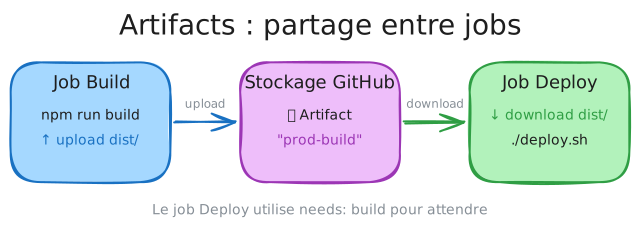
Anatomy of an artifact
An artifact is a bundle of files with three characteristics:
| Property | Description | Example |
|---|---|---|
| Name | Unique identifier inside the workflow | build-output |
| Content | Files or folders (compressed automatically) | dist/, coverage/*.html |
| Retention | How long it is kept (1 to 90 days) | retention-days: 5 |
Think of it as a labelled box you drop in a locker. The label (the name) lets others find it again. The content can be anything. And the locker is emptied automatically after a while.
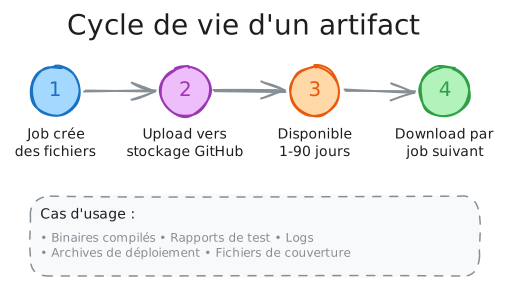
Your first workflow with artifacts
Let us take the example from the beginning and fix it. We will go step by step to understand every line.
-
The
buildjob generates and uploads the files.github/workflows/build-deploy.yml name: Build & Deployon:push:branches: [main]# No rights by default: every job asks for the minimumpermissions: {}jobs:build:runs-on: ubuntu-24.04permissions:contents: readsteps:- name: Checkout the codeuses: actions/checkout@11bd71901bbe5b1630ceea73d27597364c9af683 # v4.2.2with:persist-credentials: false- name: Build the applicationrun: npm ci && npm run build# At this point, dist/ exists on the runner- name: Save the build filesuses: actions/upload-artifact@ea165f8d65b6e75b540449e92b4886f43607fa02 # v4.6.2with:name: dist-production # The label of our boxpath: dist/ # What we put insideretention-days: 1 # Keep for 1 day (enough for CI)# dist/ is now copied onto the GitHub serversWhat happens: the
upload-artifactaction takes thedist/folder, compresses it into a ZIP, and sends it to GitHub storage under thedist-productionlabel. Even once the runner is destroyed, that file stays reachable. -
The
deployjob waits and downloadsdeploy:runs-on: ubuntu-24.04needs: build # CRUCIAL: waits for build to be donepermissions:contents: readsteps:- name: Checkout the codeuses: actions/checkout@3d3c42e5aac5ba805825da76410c181273ba90b1 # v7.0.1with:persist-credentials: false- name: Fetch the build filesuses: actions/download-artifact@3e5f45b2cfb9172054b4087a40e8e0b5a5461e7c # v8.0.1with:name: dist-production # The same label as the uploadpath: dist/ # Where to extract the files- name: Check that the files are thererun: ls -la dist/# You should see all your files!- name: Deployrun: echo "Deploying dist/ to production..."Two crucial points:
-
needs: build: without that line, the jobs run in parallel. Thedeployjob would start beforebuildis finished, and the artifact would not exist yet. A guaranteed error. -
name: dist-production: it must be identical in the upload and in the download. It is the label that lets you find the right box.
-
-
Check that it works
Once you have pushed your workflow, go to the Actions tab of your GitHub repository. You should see:
Build & Deploy├── build (32s)│ └── Artifact: dist-production (2.4 MB)└── deploy (18s)└── Downloaded: dist-productionAt the bottom of the workflow run page, you will also see an Artifacts section with a link to download the ZIP by hand.
Understanding the whole flow
Let us recap what happens, chronologically:
Time Event───── ──────────────────────────────────────────────────────────0:00 Push to main -> GitHub Actions starts the workflow0:01 Runner #1 allocated for the "build" job0:03 Checkout of the code on runner #10:05 npm ci + npm run build -> dist/ created on runner #10:35 upload-artifact: dist/ compressed and sent to GitHub Storage0:37 "build" job done -> runner #1 DESTROYED (local dist/ removed) But the "dist-production" artifact stays on GitHub Storage0:38 Runner #2 allocated for the "deploy" job (needs: build satisfied)0:40 download-artifact: fetches the artifact from GitHub Storage0:41 dist/ restored on runner #2 -> deployment possible0:55 "deploy" job done -> runner #2 DESTROYED The artifact stays available for 1 day, for debugging or downloadThe artifact survives the destruction of the runners. That is the key.
The common use cases
Three situations come back constantly and cover the bulk of the needs. Each one comes with its complete workflow, ready to adapt.
Sharing a build between parallel tests
A classic scenario: you compile once, then run several kinds of tests in parallel on the same build. Without artifacts, every test job would have to recompile the application.
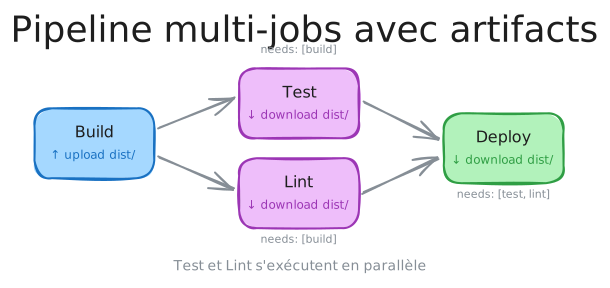
name: CI
on: [push, pull_request]
# No rights by default: every job asks for the minimumpermissions: {}
jobs:  # ════════════════════════════════════════════════════════════════  # STAGE 1: a single build  # ════════════════════════════════════════════════════════════════  build:    runs-on: ubuntu-24.04    permissions:      contents: read    steps:      - name: Checkout the code        uses: actions/checkout@11bd71901bbe5b1630ceea73d27597364c9af683 # v4.2.2        with:          persist-credentials: false
      - name: Setup Node.js        uses: actions/setup-node@49933ea5288caeca8642d1e84afbd3f7d6820020 # v4.4.0        with:          node-version: 20
      - name: Install & Build        run: npm ci && npm run build
      - name: Upload build        uses: actions/upload-artifact@ea165f8d65b6e75b540449e92b4886f43607fa02 # v4.6.2        with:          name: app-build          path: dist/          retention-days: 1
  # ════════════════════════════════════════════════════════════════  # STAGE 2: tests in parallel (all depending on build)  # ════════════════════════════════════════════════════════════════  test-unit:    needs: build    runs-on: ubuntu-24.04    permissions:      contents: read    steps:      - name: Checkout the code        uses: actions/checkout@11bd71901bbe5b1630ceea73d27597364c9af683 # v4.2.2        with:          persist-credentials: false
      - name: Download build        uses: actions/download-artifact@95815c38cf2ff2164869cbab79da8d1f422bc89e # v4.2.1        with:          name: app-build          path: dist/
      - name: Run unit tests        run: npm ci && npm run test:unit
  test-integration:    needs: build    runs-on: ubuntu-24.04    permissions:      contents: read    steps:      - name: Checkout the code        uses: actions/checkout@11bd71901bbe5b1630ceea73d27597364c9af683 # v4.2.2        with:          persist-credentials: false
      - name: Download build        uses: actions/download-artifact@95815c38cf2ff2164869cbab79da8d1f422bc89e # v4.2.1        with:          name: app-build          path: dist/
      - name: Run integration tests        run: npm ci && npm run test:integration
  test-e2e:    needs: build    runs-on: ubuntu-24.04    permissions:      contents: read    steps:      - name: Checkout the code        uses: actions/checkout@11bd71901bbe5b1630ceea73d27597364c9af683 # v4.2.2        with:          persist-credentials: false
      - name: Download build        uses: actions/download-artifact@95815c38cf2ff2164869cbab79da8d1f422bc89e # v4.2.1        with:          name: app-build          path: dist/
      - name: Run E2E tests        run: npm ci && npx playwright test
  # ════════════════════════════════════════════════════════════════  # STAGE 3: deployment (waits for ALL the tests)  # ════════════════════════════════════════════════════════════════  deploy:    needs: [test-unit, test-integration, test-e2e]    if: github.ref == 'refs/heads/main'    runs-on: ubuntu-24.04    permissions:      contents: read    steps:      - name: Download build        uses: actions/download-artifact@95815c38cf2ff2164869cbab79da8d1f422bc89e # v4.2.1        with:          name: app-build          path: dist/
      - name: Deploy to production        run: echo "Deploying..."
What that gives you:
build (2 min) │ ├─── test-unit (30s) ─┐ ├─── test-integration (1m) ├─ In parallel! └─── test-e2e (2m) ─┘ │ deploy (20s)Without artifacts, every test job would have to rebuild (2 min × 3 = 6 min). With a single shared build, you save 4 minutes per pipeline.
Keeping the test reports
Test reports (coverage, results) are precious for debugging. Upload them as artifacts so that you can look at them after the run.
  test:    runs-on: ubuntu-24.04    permissions:      contents: read    steps:      - name: Checkout the code        uses: actions/checkout@3d3c42e5aac5ba805825da76410c181273ba90b1 # v7.0.1        with:          persist-credentials: false
      - name: Run tests with coverage        run: npm ci && npm run test:coverage
      - name: Upload test results        uses: actions/upload-artifact@043fb46d1a93c77aae656e7c1c64a875d1fc6a0a # v7.0.1        if: always()              # Upload even if the tests failed        with:          name: test-results          path: |            coverage/            test-results/          retention-days: 7       # Keep for 7 days for analysis
The if: always() matters: without it, if the tests fail the upload is skipped
and you lose the very reports that could have helped you debug.
Collecting the artifacts of a matrix
When you use a matrix (tests on several Node versions, several operating systems), every combination can produce its own artifacts.
  test:    strategy:      matrix:        node: [18, 20, 22]        os: [ubuntu-24.04, windows-2022]
    runs-on: ${{ matrix.os }}    permissions:      contents: read    steps:      - name: Checkout the code        uses: actions/checkout@3d3c42e5aac5ba805825da76410c181273ba90b1 # v7.0.1        with:          persist-credentials: false
      - name: Setup Node ${{ matrix.node }}        uses: actions/setup-node@820762786026740c76f36085b0efc47a31fe5020 # v7.0.0        with:          node-version: ${{ matrix.node }}
      - name: Run tests        run: npm ci && npm test
      - name: Upload coverage        uses: actions/upload-artifact@043fb46d1a93c77aae656e7c1c64a875d1fc6a0a # v7.0.1        with:          # A unique name for every combination          name: coverage-node${{ matrix.node }}-${{ matrix.os }}          path: coverage/
  # A job collecting ALL the reports to merge them  merge-coverage:    needs: test    runs-on: ubuntu-24.04    steps:      - name: Download all coverage reports        uses: actions/download-artifact@3e5f45b2cfb9172054b4087a40e8e0b5a5461e7c # v8.0.1        with:          pattern: coverage-*           # Every coverage-* artifact          path: all-coverage/          merge-multiple: true          # Merges into a single folder
      - name: Merge and publish        run: |          ls -la all-coverage/          # Here, merge the reports with your favourite tool
The advanced options
The default settings are fine to get started, but they often send too many files and keep them for too long. These options reduce the transfer time and the storage bill.
Upload: controlling what leaves
- uses: actions/upload-artifact@043fb46d1a93c77aae656e7c1c64a875d1fc6a0a # v7.0.1 with: name: release-build path: | dist/ # The whole dist folder !dist/**/*.map # EXCEPT the source maps !dist/**/*.d.ts # EXCEPT the TypeScript declarations retention-days: 30 # Keep for 30 days (release) compression-level: 9 # Maximum compression (slower but smaller) if-no-files-found: error # Fails if dist/ is empty| Option | Values | Description |
|---|---|---|
retention-days | 1-90 | How long it is kept. Default: 90 days. |
compression-level | 0-9 | 0 = no compression, 9 = maximum. Default: 6. |
if-no-files-found | warn, error, ignore | Behaviour when no file is found. |
Download: controlling what arrives
# Download ONE specific artifact- uses: actions/download-artifact@3e5f45b2cfb9172054b4087a40e8e0b5a5461e7c # v8.0.1  with:    name: build-output    path: ./my-folder/           # A custom destination
# Download EVERY artifact of the run- uses: actions/download-artifact@3e5f45b2cfb9172054b4087a40e8e0b5a5461e7c # v8.0.1  with:    path: ./all-artifacts/       # Each artifact in its own subfolder
# Download by pattern- uses: actions/download-artifact@3e5f45b2cfb9172054b4087a40e8e0b5a5461e7c # v8.0.1 with: pattern: coverage-* # Every matching one merge-multiple: true # Merge into a single folderTroubleshooting
Artifact failures all look alike: the downloading job stops without having found what it expected. The cause, however, differs sharply from one case to the next.
"Artifact not found"
Error: Unable to find any artifacts for the associated workflow runDiagnostic checklist:
-
Has the producing job finished?
- Check that
needs: <producing-job>is there - Without
needs, the jobs run in parallel, so the artifact does not exist yet
- Check that
-
Is the name correct?
- Compare it character by character:
dist-buildis notdist_build, and neither isdistbuild - Copy and paste the name to avoid typos
- Compare it character by character:
-
Has the artifact expired?
- Check
retention-daysin the upload - Artifacts expire silently
- Check
-
Did the upload succeed?
- Read the logs of the producing job
- Look for "Artifact ... has been successfully uploaded"
"No files found"
Warning: No files were found with the provided path: dist/The path does not exist at upload time. Add a debugging step:
- name: Debug, check the files before the upload  run: |    echo "=== Current directory ==="    pwd    echo "=== Content of dist/ ==="    ls -la dist/ || echo "dist/ does not exist!"    echo "=== Complete tree ==="    find . -name "*.js" -o -name "*.html" | head -20
- name: Upload artifact  uses: actions/upload-artifact@043fb46d1a93c77aae656e7c1c64a875d1fc6a0a # v7.0.1  with:    name: my-build    path: dist/    if-no-files-found: error    # Fails explicitly when empty
The files are not where you expect
After the download, your commands cannot find the files.
Likely cause: download-artifact creates a subfolder by default.
# What you write:- uses: actions/download-artifact@3e5f45b2cfb9172054b4087a40e8e0b5a5461e7c # v8.0.1  with:    name: my-build
# What you get:# ./my-build/          <- Folder created automatically#   └── index.html#   └── main.js
# What you probably wanted:- uses: actions/download-artifact@3e5f45b2cfb9172054b4087a40e8e0b5a5461e7c # v8.0.1  with:    name: my-build    path: dist/         <- Extracted straight into dist/
# Result:# ./dist/#   └── index.html#   └── main.js
Good practices
These rules avoid the two most frequent annoyances in a team: artifacts nobody can tie back to a run, and a storage consumption growing without anyone watching it.
Name them clearly
Artifact names must be explicit and unique:
# ✅ Good namesname: frontend-build-prodname: api-build-${{ github.sha }}name: test-coverage-node20-ubuntuname: release-v${{ github.ref_name }}
# ❌ Bad namesname: build          # Too genericname: output         # Saying what, exactly?name: files          # Which files?
Optimise the size
Artifacts are stored and transferred. The bigger they are, the slower and the more expensive they get.
- uses: actions/upload-artifact@043fb46d1a93c77aae656e7c1c64a875d1fc6a0a # v7.0.1 with: name: production-build path: | dist/ !dist/**/*.map # Exclude the source maps (often 50 % of the weight) !dist/**/*.d.ts # Exclude the TypeScript declarations !dist/**/*.test.js # Exclude the test files compression-level: 9 # Maximum compression for releasesAdapt the retention
| Kind of build | Suggested retention |
|---|---|
| Daily CI and PRs | 1-3 days |
| Feature branches | 7 days |
| Release candidates | 30 days |
| Official releases | 90 days (maximum) |
# Fast CI: not kept for longretention-days: 1
# Release: kept so that you can roll back or analyseretention-days: 90
Security
Limits and costs
| Limit | Value |
|---|---|
| Maximum size of one artifact | 10 GB |
| Storage included (Free) | 500 MB |
| Storage included (Pro) | 2 GB |
| Storage included (Team) | 2 GB |
| Storage included (Enterprise) | 50 GB |
| Maximum retention | 90 days (public) / 400 days (private) |
Beyond the free quota, every extra GB is billed. That is why retention-days: 1
is recommended for the daily CI.
Check your understanding
Make sure the essentials of this guide are yours. The questions only cover what was explained here.
Knowledge check
Check what you have learned with this interactive quiz
How it works
- The timer starts when you click Start
- Multiple choice, true/false and short answer questions
- You can move between questions
- Detailed results are shown at the end
Starts the quiz and the timer
Review
(0/0)Skills profile
What to do next
Resources to go further
Hints before you try again?
A new full quiz with random questions
Work again only on the questions you missed
Key points
-
Every job is an isolated runner: files do not teleport from one job to the next
-
The artifact is the hatch: a storage space outside the runners, to move files across
-
needs:is mandatory: without it, the consuming job starts before the artifact exists -
The same name everywhere: the name in
upload-artifactmust be identical to the one indownload-artifact -
retention-days: 1for the CI: it saves storage, and it is enough for daily builds -
Never any secret: artifacts are reachable by every collaborator, and by the public on an open repository
Next steps
- Artifacts vs Cache: deciding between the two mechanisms now that you know how to publish and fetch an artifact.
- Concurrency: preventing two simultaneous runs from producing contradictory artifacts under the same name.
- GitHub CLI (gh): downloading and inspecting the artifacts of a run from the terminal with
gh run download.