

Imagine you have to test your application on three operating systems and three Node.js versions. That is nine combinations. Without the right tool, you would copy the same code nine times. The matrix strategy solves that elegantly.
What is a matrix, concretely?
A matrix describes axes of variation, and GitHub generates one job per combination. You write the job definition once, and the platform takes care of the duplication.
Before and after: what a matrix buys you
❌ Without a matrix: massive duplication
jobs:  test-ubuntu-18:    runs-on: ubuntu-24.04    steps:      - uses: actions/setup-node@49933ea5288caeca8642d1e84afbd3f7d6820020  # v4        with:          node-version: 18      - run: npm test
  test-ubuntu-20:    runs-on: ubuntu-24.04    steps:      - uses: actions/setup-node@49933ea5288caeca8642d1e84afbd3f7d6820020  # v4        with:          node-version: 20      - run: npm test
  test-ubuntu-22:    # ... over and over  test-windows-18:    # ... six more identical jobs
✅ With a matrix: a single block
jobs: test: strategy: matrix: os: [ubuntu-24.04, windows-2025, macos-15] node: [18, 20, 22] runs-on: ${{ matrix.os }} steps: - uses: actions/setup-node@820762786026740c76f36085b0efc47a31fe5020 # v7.0.0 with: node-version: ${{ matrix.node }} - run: npm testYour first matrix in three steps
-
Define the axes: which variables do you want to combine?
strategy:matrix:os: [ubuntu-24.04, windows-2025]python: ['3.10', '3.11', '3.12'] -
Use the variables: read the values with
${{ matrix.xxx }}runs-on: ${{ matrix.os }}steps:- uses: actions/setup-python@5fda3b95a4ea91299a34e894583c3862153e4b97 # v7.0.0with:python-version: ${{ matrix.python }} -
Run the workflow: GitHub generates 2 × 3 = 6 jobs automatically
A complete annotated example
name: Multi-configuration tests
on: [push, pull_request]
jobs:  test:    # The job name shows the matrix values    name: Test Python ${{ matrix.python }} on ${{ matrix.os }}
    strategy:      matrix:        # Axis 1: the operating systems        os: [ubuntu-24.04, windows-2025]        # Axis 2: the Python versions        python: ['3.10', '3.11', '3.12']
    # This line USES the value of matrix.os    runs-on: ${{ matrix.os }}
    steps:      - uses: actions/checkout@3d3c42e5aac5ba805825da76410c181273ba90b1 # v7.0.1
      # This action USES the value of matrix.python      - uses: actions/setup-python@5fda3b95a4ea91299a34e894583c3862153e4b97 # v7.0.0        with:          python-version: ${{ matrix.python }}
      - run: pip install -e ".[test]"      - run: pytest
The result in the GitHub interface:
✓ Test Python 3.10 on ubuntu-24.04 (2m 15s)✓ Test Python 3.11 on ubuntu-24.04 (2m 08s)✓ Test Python 3.12 on ubuntu-24.04 (2m 12s)✓ Test Python 3.10 on windows-2025 (3m 45s)✓ Test Python 3.11 on windows-2025 (3m 38s)✓ Test Python 3.12 on windows-2025 (3m 42s)How does it work technically?
The number of generated jobs is calculated, not guessed. Knowing how to predict it avoids the unpleasant surprise of a workflow suddenly starting forty runs.
The cartesian product
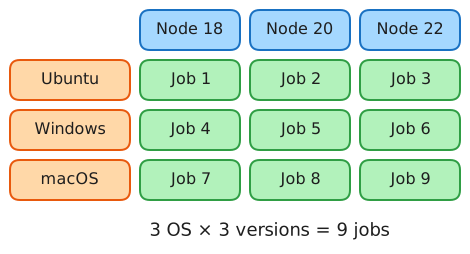
GitHub computes the cartesian product of every axis. Do not let the mathematical term put you off: it simply means all the possible combinations of your value lists.
Picture a restaurant menu: with 2 starters and 3 mains, you can compose 2 × 3 = 6 different menus. That is exactly the cartesian product.
With a two-axis matrix:
Axis 1: [A, B]     ┐                   ├──→ Combinations: [A,X], [A,Y], [B,X], [B,Y]Axis 2: [X, Y]     ┘
2 × 2 = 4 jobs
How do you read this? GitHub takes each value of the first axis (A, then B) and pairs it with each value of the second (X, then Y). The result: four combinations, so four parallel jobs.
With three axes the principle holds, you simply multiply the possibilities:
os: [ubuntu, windows] 2 valuesnode: [18, 20, 22] 3 valuesdatabase: [postgres, mysql] 2 values ───────── 2 × 3 × 2 = 12 jobsIn concrete terms: every combination of OS, Node version and database gets tested. Ubuntu with Node 18 and Postgres, Ubuntu with Node 18 and MySQL, Ubuntu with Node 20 and Postgres, and so on up to the twelfth.
The matrix variables
Every value defined in the matrix becomes reachable through the matrix
context:
strategy:  matrix:    fruit: [apple, banana]    colour: [red, yellow]
# Inside the steps you can use:# ${{ matrix.fruit }}  → "apple" or "banana"# ${{ matrix.colour }} → "red" or "yellow"
Include: adding or enriching combinations
The include keyword is a bonus for your matrix. It does two things:
- Add combinations that do not exist in the cartesian product
- Enrich existing combinations with extra variables
Case 1: adding a special combination
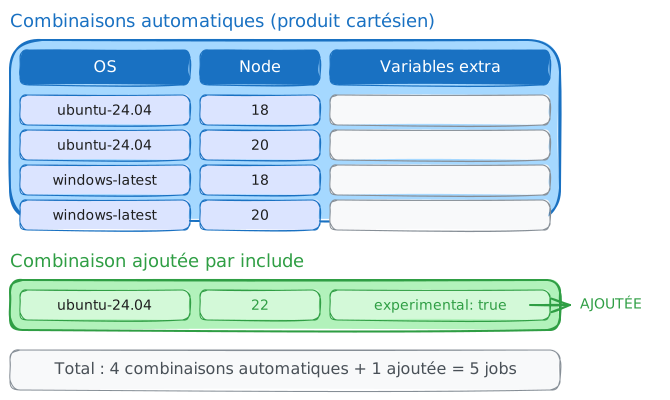
Say you want to test Node 22, but only on Ubuntu, because it is experimental elsewhere:
strategy: matrix: os: [ubuntu-24.04, windows-2025] node: [18, 20] include: # This combination DOES NOT EXIST in the cartesian product # (node 22 is not in the original list) - os: ubuntu-24.04 node: 22 experimental: true # A bonus variable for this combinationWithout include: 2 × 2 = 4 combinations.
With include: 4 + 1 = 5 combinations.
Case 2: enriching an existing combination
Sometimes you need variables that differ per combination. The default shell, for instance, varies with the operating system:
strategy:  matrix:    os: [ubuntu-24.04, windows-2025, macos-15]    include:      # These lines ENRICH the existing combinations      # by adding a "shell" variable      - os: windows-2025        shell: pwsh           # PowerShell on Windows      - os: ubuntu-24.04        shell: bash           # Bash on Ubuntu      - os: macos-15        shell: bash           # Bash on macOS
runs-on: ${{ matrix.os }}defaults: run: shell: ${{ matrix.shell }} # Uses the right shellCase 3: a matrix built only from include
You can build a matrix without axes, purely from include. That is useful
for configurations that differ wildly:
strategy:  matrix:    include:      - name: 'Production EU'        region: 'eu-west-1'        env: 'prod'        replicas: 3      - name: 'Production US'        region: 'us-east-1'        env: 'prod'        replicas: 3      - name: 'Staging'        region: 'eu-west-1'        env: 'staging'        replicas: 1
# Three jobs with completely custom configurations
Exclude: removing unwanted combinations
exclude does the opposite of include: it removes combinations from the
cartesian product. It is a way of saying "I want everything except this".
Why exclude combinations?
A few common reasons:
- a version is not supported on a particular operating system;
- a combination is redundant or pointless;
- you want to save CI minutes on irrelevant tests.
A concrete example
strategy: matrix: os: [ubuntu-24.04, windows-2025, macos-15] node: [18, 20, 22] exclude: # Node 22 has known problems on Windows - os: windows-2025 node: 22 # We do not test every version on macOS (expensive) - os: macos-15 node: 18Counting the jobs:
- cartesian product: 3 × 3 = 9 combinations
- exclusions: minus 2 combinations
- total: 7 jobs
Controlling execution: fail-fast and max-parallel
By default, a matrix launches everything in parallel and stops at the first failure. These two settings arbitrate between speed of feedback and the amount of information gathered in a single run.
fail-fast: stop everything, or carry on?
By default, fail-fast is true. That means if a single job of the matrix
fails, GitHub cancels every other one immediately.
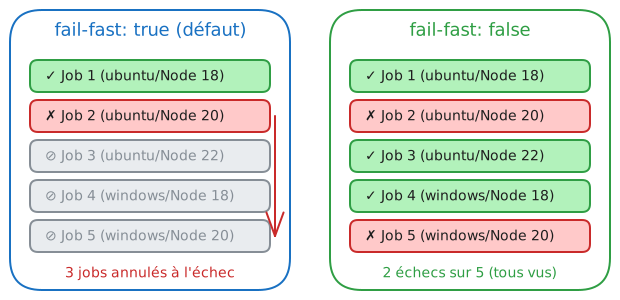
When to keep fail-fast: true (the default):
- you want fast feedback;
- one failure makes the other results useless;
- you are saving CI minutes.
When to use fail-fast: false:
- you want to see every result;
- you are debugging and looking for which combinations fail;
- the jobs are independent.
strategy: fail-fast: false # Carry on even when a job fails matrix: node: [18, 20, 22]max-parallel: limiting simultaneous jobs
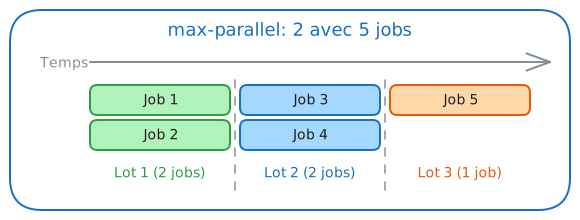
By default, GitHub launches every job in parallel. With max-parallel, you
can cap that number:
strategy: max-parallel: 2 # At most 2 jobs at a time matrix: node: [18, 20, 22] # 3 jobs in totalWhy limit parallelism?
| Situation | Reason |
|---|---|
| Tests sharing a database | Avoid data conflicts |
| An external API with rate limiting | Stay under the quota |
| Limited self-hosted runners | Avoid saturation |
| Saving minutes | Reduce costs (private repositories) |
Advanced techniques
These constructs matter when the matrix values are unknown at writing time, or when they depend on the run context.
A dynamic matrix with fromJSON
Sometimes you do not know the matrix values in advance. You may want to test only the modules that changed, for instance. The answer is to generate the matrix dynamically in a first job.
jobs:  # Job 1: decide what to test  setup:    runs-on: ubuntu-24.04    outputs:      matrix: ${{ steps.set-matrix.outputs.matrix }}    steps:      - id: set-matrix        run: |          # Produces the JSON that will become the matrix          echo 'matrix={"version":["1.0","2.0","3.0"]}' >> $GITHUB_OUTPUT
# Job 2: use the generated matrix build: needs: setup strategy: # fromJSON turns the string into an object matrix: ${{ fromJSON(needs.setup.outputs.matrix) }} runs-on: ubuntu-24.04 steps: - run: echo "Building version ${{ matrix.version }}"A matrix from a configuration file
For better maintainability, store the matrix in a file.
The .github/matrix.json file:
{ "include": [ { "name": "app-frontend", "path": "./apps/frontend" }, { "name": "app-backend", "path": "./apps/backend" }, { "name": "app-api", "path": "./apps/api" } ]}The workflow:
jobs:  setup:    runs-on: ubuntu-24.04    outputs:      matrix: ${{ steps.read.outputs.matrix }}    steps:      - uses: actions/checkout@3d3c42e5aac5ba805825da76410c181273ba90b1 # v7.0.1      - id: read        run: |          # jq -c compacts the JSON onto a single line          echo "matrix=$(cat .github/matrix.json | jq -c .)" >> $GITHUB_OUTPUT
  test:    needs: setup    strategy:      matrix: ${{ fromJSON(needs.setup.outputs.matrix) }}    runs-on: ubuntu-24.04    steps:      - run: echo "Testing ${{ matrix.name }} at ${{ matrix.path }}"
Ready-to-use examples
These workflows are complete and work as they stand. Adapt the versions and the repository names, the rest holds unchanged.
Multi-version Python testing
A classic: testing across several Python versions and several operating systems.
name: Python tests
on: [push, pull_request]
permissions:  contents: read
jobs:  test:    name: Python ${{ matrix.python }} / ${{ matrix.os }}    strategy:      fail-fast: false    # See every result      matrix:        os: [ubuntu-24.04, windows-2025, macos-15]        python: ['3.10', '3.11', '3.12']        exclude:          # macOS is expensive, so we limit the versions tested          - os: macos-15            python: '3.10'
    runs-on: ${{ matrix.os }}
    steps:      - uses: actions/checkout@3d3c42e5aac5ba805825da76410c181273ba90b1 # v7.0.1
      - uses: actions/setup-python@5fda3b95a4ea91299a34e894583c3862153e4b97 # v7.0.0        with:          python-version: ${{ matrix.python }}
      - run: pip install -e ".[test]"      - run: pytest --verbose
Multi-architecture Docker build
To build ARM64 and AMD64 images:
name: Build Multi-Arch
on:  push:    branches: [main]
permissions:  contents: read
jobs:  build:    name: Build ${{ matrix.platform }}    strategy:      matrix:        include:          - platform: linux/amd64            runner: ubuntu-24.04          - platform: linux/arm64            runner: ubuntu-24.04-arm    # A native ARM runner
    runs-on: ${{ matrix.runner }}
    steps:      - uses: actions/checkout@3d3c42e5aac5ba805825da76410c181273ba90b1 # v7.0.1
      - name: Build the image        env:          PLATFORM: ${{ matrix.platform }}          TAG: ${{ github.sha }}        run: |          docker build \            --platform "$PLATFORM" \            -t "myapp:$TAG-${PLATFORM//\//-}" .
Multi-environment deployment
Deploying to staging or production depending on the operator's choice:
name: Deploy
on:  workflow_dispatch:    inputs:      target:        description: 'Where to deploy?'        type: choice        options: [staging, production]        default: staging
permissions:  contents: read
jobs:  deploy:    name: Deploy to ${{ matrix.env }}    strategy:      matrix:        include:          - env: staging            url: https://staging.example.com            replicas: 1          - env: production            url: https://example.com            replicas: 3        exclude:          # A trick: exclude the environment that was not chosen          - env: ${{ github.event.inputs.target == 'staging' && 'production' || 'staging' }}
    environment: ${{ matrix.env }}    runs-on: ubuntu-24.04
    steps:      - env:          TARGET_ENV: ${{ matrix.env }}          TARGET_URL: ${{ matrix.url }}          REPLICAS: ${{ matrix.replicas }}        run: |          echo "Deploying to $TARGET_ENV"          echo "URL: $TARGET_URL"          echo "Replicas: $REPLICAS"
The five golden rules of matrices
These five reflexes separate a readable, thrifty matrix from one that saturates the runners for reasons nobody can explain.
1. Name your jobs explicitly
Without a custom name, GitHub shows "test (1)", "test (2)", which helps nobody.
jobs: test: # ✅ An explicit name carrying the matrix values name: Test ${{ matrix.os }} / Node ${{ matrix.node }} strategy: matrix: os: [ubuntu-24.04, windows-2025] node: [18, 20]The result in the interface:
✓ Test ubuntu-24.04 / Node 18 (2m 15s)✓ Test ubuntu-24.04 / Node 20 (2m 08s)✓ Test windows-2025 / Node 18 (3m 45s)✓ Test windows-2025 / Node 20 (3m 38s)2. Use fail-fast: false while debugging
When you are hunting for which combinations fail, you want every result:
strategy: fail-fast: false # Do not cancel the other jobs on failure matrix: node: [18, 20, 22]3. Keep your matrix small
# ❌ AVOID: 3 × 4 × 3 = 36 combinations!matrix:  os: [ubuntu, windows, macos]  node: [16, 18, 20, 22]  database: [postgres, mysql, sqlite]
# ✅ PREFER: targeted combinationsmatrix:  include:    # Full test on Ubuntu (the reference)    - os: ubuntu-24.04      node: 20      database: postgres    # Windows validation    - os: windows-2025      node: 20      database: postgres    # Backward-compatibility test    - os: ubuntu-24.04      node: 18      database: mysql
4. Handle the specifics of each OS
Windows and Linux do not use the same commands. Use include to customise:
strategy:  matrix:    os: [ubuntu-24.04, windows-2025]    include:      - os: ubuntu-24.04        script: ./scripts/test.sh        shell: bash      - os: windows-2025        script: .\scripts\test.ps1        shell: pwsh
steps:  - run: ${{ matrix.script }}    shell: ${{ matrix.shell }}
5. Document your exclusions
Exclusions can look mysterious to contributors. Always add a comment:
exclude:  # Python 3.9 reached end of life (October 2025)  # We only keep it on Ubuntu for legacy systems  - python: '3.9'    os: macos-15  - python: '3.9'    os: windows-2025
  # Node 22 has a known bug on Windows Server  # See https://github.com/nodejs/node/issues/XXXXX  - node: 22    os: windows-2025
Check your understanding
Make sure the essentials of this guide are yours. The questions only cover what was explained here.
Knowledge check
Check what you have learned with this interactive quiz
How it works
- The timer starts when you click Start
- Multiple choice, true/false and short answer questions
- You can move between questions
- Detailed results are shown at the end
Starts the quiz and the timer
Review
(0/0)Skills profile
What to do next
Resources to go further
Hints before you try again?
A new full quiz with random questions
Work again only on the questions you missed
Key points
| Concept | Syntax | Usage |
|---|---|---|
| Matrix axes | matrix: { os: [...], node: [...] } | Define the combinations |
| Reading values | ${{ matrix.os }} | Use them inside the steps |
| Add or enrich | include: [...] | Special cases |
| Exclude | exclude: [...] | Remove combinations |
| Carry on after failure | fail-fast: false | Debugging |
| Cap parallelism | max-parallel: N | Limited resources |
| Dynamic matrix | fromJSON(...) | Computed values |
Next steps
- Reusable workflows: passing a matrix as an input so several repositories share the same test plan.
- Composite actions: factoring out the steps each matrix combination repeats.
- Securing GitHub Actions: what a wide matrix changes for the pinning and the permissions of every job it spawns.