

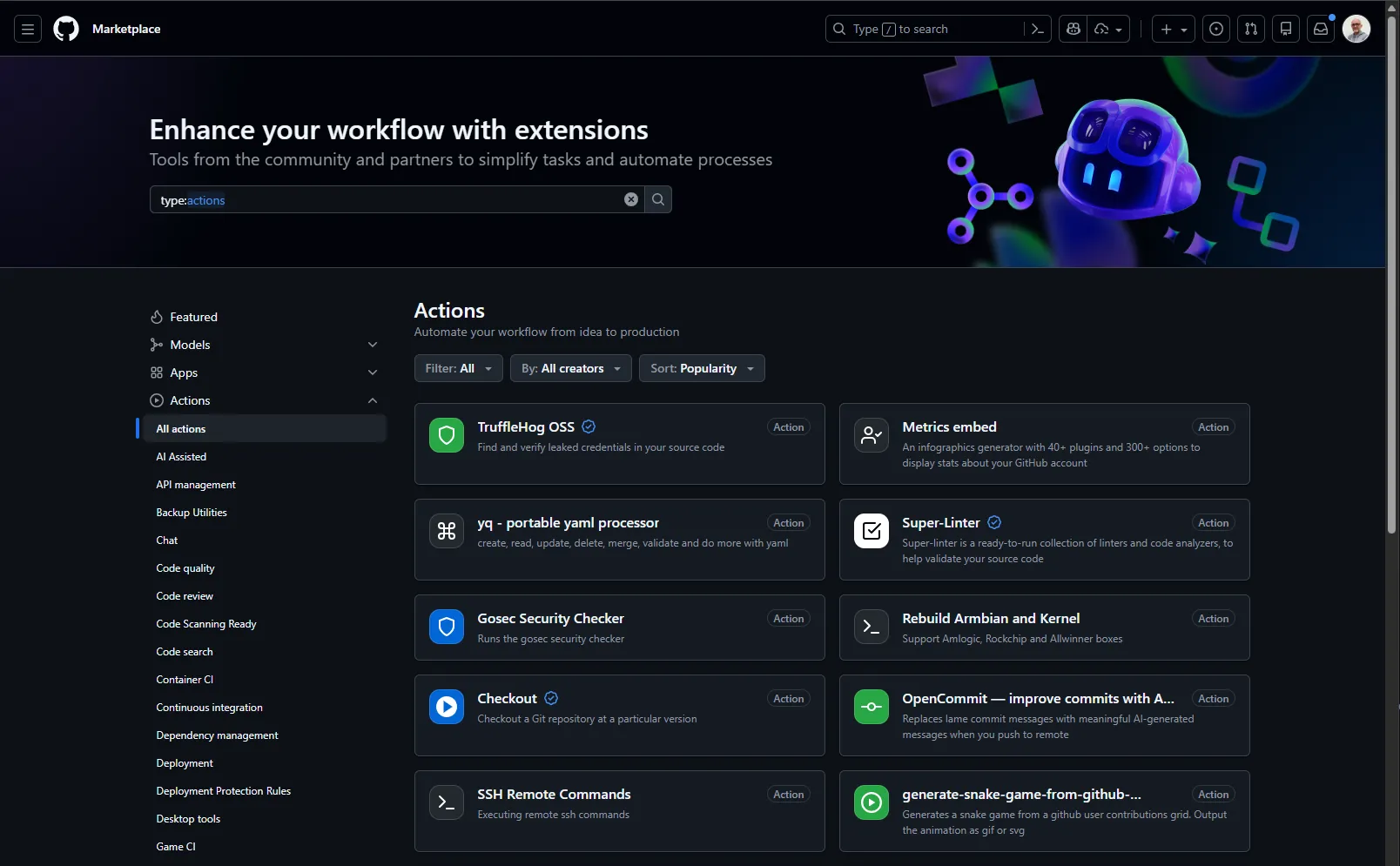
The GitHub Actions Marketplace is a catalogue gathering thousands of reusable
actions built by GitHub, by vendors and by the community. Rather than
rewriting the logic to clone a repository, install Node.js or deploy to AWS, you
use an existing action with uses:.
It saves an enormous amount of time. It is also a major security risk if you cannot evaluate what you are about to use.
What is an action?
An action is a reusable component wrapping one task. Instead of writing 20 lines of shell to set up Python with caching, you write:
- uses: actions/setup-python@5fda3b95a4ea91299a34e894583c3862153e4b97 # v7.0.0 with: python-version: '3.12' cache: 'pip'The setup-python action handles everything: download, installation, PATH
configuration, dependency caching. You focus on your own logic.
The three kinds of actions
| Kind | Description | Linux | macOS | Windows |
|---|---|---|---|---|
| JavaScript | JS code run directly on the runner | ✅ | ✅ | ✅ |
| Docker | A container with a complete environment | ✅ | ❌ | ❌ |
| Composite | An assembly of other actions and commands | ✅ | ✅ | ✅ |
JavaScript actions are the fastest (no image pull) and work on every runner. Docker actions are heavier but guarantee an isolated, reproducible environment; note that they run on Linux only.
Anatomy of an action reference
When you write actions/checkout@v4 after uses:, here is what it means:
uses: actions/checkout@3d3c42e5aac5ba805825da76410c181273ba90b1 # v7.0.1 └──────┬──────┘ └┬┘ owner/repo ref- owner: the GitHub organisation or user (here
actions, GitHub's official organisation) - repo: the name of the repository holding the action
- ref: the version to use (a tag, a branch, or a SHA)
The different ways to reference a version
# ❌ Tag (the most common, but MUTABLE)- uses: actions/checkout@v7
# ❌ Branch (DANGEROUS: changes on every commit)- uses: actions/checkout@main
# ✅ Full SHA (RECOMMENDED: immutable), version in a comment- uses: actions/checkout@3d3c42e5aac5ba805825da76410c181273ba90b1 # v7.0.1Finding actions on the Marketplace
The Marketplace lives at github.com/marketplace?type=actions. You can search by category or by keyword.
The main categories
| Category | Example actions |
|---|---|
| Continuous integration | Tests, linting, build |
| Deployment | AWS, Azure, GCP, Kubernetes |
| Code quality | SonarQube, CodeClimate |
| Security | Trivy, Snyk, CodeQL |
| Utilities | Cache, artifacts, notifications |
Official GitHub actions
The actions organisation maintains official actions, tested and secured:
| Action | Description |
|---|---|
actions/checkout | Clones the repository |
actions/setup-node | Sets up Node.js |
actions/setup-python | Sets up Python |
actions/cache | Caches dependencies |
actions/upload-artifact | Saves files between jobs |
actions/download-artifact | Retrieves artifacts |
These actions are a good starting point. They are actively maintained, documented, and follow security good practices.
Evaluating an action before using it
Before adding an action to your workflow, ask yourself these questions.
-
Who is the author?
On the Marketplace, look for the Verified creator badge, which means GitHub has verified the organisation's identity. Actions from
actions/*(GitHub),aws-actions/*(AWS) ordocker/*(Docker Inc.) inspire more confidence than one fromrandom-user-42. -
Is it maintained?
Check the date of the last commit, the open issues, and how responsive the maintainers are. An action abandoned two years ago is a risk.
-
How many people use it?
The number of stars and forks gives an indication. A popular action has more eyes on it, so flaws are more likely to be found.
-
Do I really need an action?
Sometimes three lines of shell are enough. An action adds a dependency and a risk. If the logic is simple, prefer
run:. -
What permissions does it ask for?
Read the documentation. If a Slack notification action asks for
contents: write, that is suspicious.
Warning signs
Be wary if:
- ❌ the repository has no documented
action.ymlfile; - ❌ the source code is unreadable (obfuscated);
- ❌ the action asks for excessive permissions;
- ❌ few stars, and the last commit is over a year old;
- ❌ no releases, just a
mainbranch; - ❌ the name looks like a popular action (typosquatting).
Security: the right reflexes
Using a third-party action means running a stranger's code with access to your secrets. Build these reflexes now.
1. Pin by SHA
Instead of mutable tags, use the full commit SHA:
# ❌ Mutable tag: it can change without warning- uses: actions/checkout@v4
# ✅ Immutable SHA: you control exactly which code runs- uses: actions/checkout@11bd71901bbe5b1630ceea73d27597364c9af683 # v4.2.2
The # v4.2.2 comment keeps the line readable while guaranteeing immutability.
How do you find the SHA?
# Always resolve an EXACT tag, never a major onegh api repos/actions/checkout/commits/v4.2.2 --jq .sha
# Reference form, which separates an annotated tag from its commitgit ls-remote --tags https://github.com/actions/checkout v4.2.2 'v4.2.2^{}'
Always resolve an exact tag, never v4. A major tag is mutable: it
points at the latest 4.x published at the moment you query the API, and
the answer does not tell you which one. You end up with a correct SHA next
to a wrong comment, the most insidious pinning defect there is: the workflow
is safe, but Dependabot, reviewers and audits all reason about the displayed
version.
That mismatch is invisible to the eye, and not every tool catches it.
pinact run --check lets it through; pinact run --verify --check rejects
it and names the cause, and zizmor reports it through its
ref-version-mismatch rule, provided you run it online.
2. Check with OpenSSF Scorecard
OpenSSF Scorecard analyses the security maturity of an open source project. Enter the URL of the action's repository to see its score.
A high score means the project follows good practices: branch protection, signed releases, dependency updates, and so on.
3. Prefer official actions
When you have the choice, prefer:
- actions from the
actions/*organisation (official GitHub); - actions from known vendors (
aws-actions/*,docker/*,azure/*); - actions from established projects (
anchore/*,aquasecurity/*).
4. Restrict the permissions
Even when an action is trustworthy, apply the principle of least privilege:
permissions:  contents: read  # Read-only by default
jobs:  test:    runs-on: ubuntu-24.04    steps:      - uses: actions/checkout@3d3c42e5aac5ba805825da76410c181273ba90b1 # v7.0.1
If the action is compromised, the damage stays limited.
5. Enable Dependabot for actions
Dependabot can watch the actions used in your workflows and alert you when a vulnerability appears. It can also open pull requests to update the actions automatically.
Add this to .github/dependabot.yml:
version: 2updates: - package-ecosystem: "github-actions" directory: "/" schedule: interval: "weekly"Dependabot opens a PR whenever a new version of an action is available, keeping the SHA pinning if you use it.
Passing parameters to an action
Most actions accept parameters through the with: property:
- uses: actions/setup-python@5fda3b95a4ea91299a34e894583c3862153e4b97 # v7.0.0 with: python-version: '3.12' # Python version cache: 'pip' # Enable the pip cache cache-dependency-path: | # Files used for the cache key requirements.txt requirements-dev.txtAlways read the action's documentation to know the available parameters. The
Marketplace page or the repository README.md lists the inputs and their
default values.
Troubleshooting
The action is not found
Error: Unable to resolve action `actions/checkout@v99`Likely causes:
- the tag or SHA does not exist;
- a typo in the action name;
- the repository is private or has been deleted.
Fix: check the exact URL on the Marketplace, and the tag in the repository releases.
Permission error
Error: Resource not accessible by integrationLikely causes:
- the action needs permissions you have not declared;
- the
GITHUB_TOKENlacks the required rights.
Fix: add the required permissions to your workflow:
permissions: contents: read issues: write # If the action has to create issuesThe action is slow
Likely causes:
- a Docker action downloading a large image;
- no cache configured;
- a poorly optimised action.
Fix: look for a JavaScript alternative, or configure the cache if the action supports it.
Writing your own actions: the best way to learn
Before looking for an action on the Marketplace, ask yourself: could I do this myself?
Writing your own actions brings several benefits:
- Full control: you know exactly what the code does
- Learning: you understand how GitHub Actions works internally
- Security: no third-party dependency means no supply chain risk
- Fit: tailored exactly to your needs
When should you write rather than reuse?
| Situation | Recommendation |
|---|---|
| Simple logic (a few commands) | run: with shell |
| Logic reused across several workflows | Composite action |
| A specific environment is needed | Docker action |
| Performance and multi-OS compatibility needed | JavaScript action |
| A complex, well-maintained task | A Marketplace action |
Example: a simple composite action
Create .github/actions/setup-project/action.yml:
name: 'Setup Project'description: 'Configure the project environment'
runs:  using: 'composite'  steps:    - name: Setup Node.js      uses: actions/setup-node@820762786026740c76f36085b0efc47a31fe5020 # v7.0.0      with:        node-version: '20'        cache: 'npm'
    - name: Install dependencies      shell: bash      run: npm ci
    - name: Verify the installation      shell: bash      run: npm --version && node --version
Use it in your workflows:
steps: - uses: actions/checkout@3d3c42e5aac5ba805825da76410c181273ba90b1 # v7.0.1 - uses: ./.github/actions/setup-project # A local actionCheck your understanding
Make sure the essentials of this guide are yours. The questions only cover what was explained here.
Knowledge check
Check what you have learned with this interactive quiz
How it works
- The timer starts when you click Start
- Multiple choice, true/false and short answer questions
- You can move between questions
- Detailed results are shown at the end
Starts the quiz and the timer
Review
(0/0)Skills profile
What to do next
Resources to go further
Hints before you try again?
A new full quiz with random questions
Work again only on the questions you missed
Key points
- Write your own actions for simple cases, it is the best way to learn
- The Marketplace holds thousands of actions, but not all of them are safe
- An action runs third-party code with access to your secrets
- Always pin by SHA to avoid surprise changes
- Evaluate the author (Verified creator badge), the maintenance, and the popularity
- Typosquatting is a real risk, check the exact spelling
- Prefer official actions (
actions/*, verified vendors) - Enable Dependabot to be alerted about vulnerabilities
Useful links
- GitHub Actions Marketplace: the official action catalogue
- About custom actions: official documentation on the action types
- Creating a composite action: a tutorial for building a composite action
Next steps
- Pinning actions by SHA: the deep dive on immutable references, tags and digests.
- Supply chain attacks on GitHub Actions: what a compromised action actually did, and the five vectors it used.
- OpenSSF Scorecard: measuring a project's security posture against nineteen objective checks.