


If your GitLab CI/CD pipeline uses unpinned Docker images, includes that track main, or a build based on Docker-in-Docker, or if your GitHub Actions workflows still reference third-party actions by mutable tag, you are exposing your chain to a supply chain attack. Plumber is a pipeline security scanner: you write a minimal configuration in the v2.0 schema, you run plumber analyze, you read three or four concrete problems, then you wire the check into your CI with the official component. This guide targets beginners and intermediates; it deliberately starts with the CLI, moves on to the GitLab component, then closes with the PBOM, the A-E score and the Platform.
What you will learn
- Create a minimal v2.0 schema configuration with
plumber config init, then validate it before the first scan - Migrate an existing v1 configuration to the v2.0 schema with
plumber config migrate - Run a local security analysis on a GitLab or a GitHub repository and understand auto-detection
- Fix the frequent flaws: unpinned image, third-party action not pinned by SHA, unauthorised action source, unprotected branch
- Add the official GitLab CI/CD component without creating duplicate pipelines or an unusable
.prejob - Export a PBOM and use it with Trivy or Grype
What is Plumber?
Plumber is a security scanner for GitLab CI/CD and GitHub Actions. On the GitLab side, it queries the project API and reads the merged configuration; on the GitHub side, it analyses the files of .github/workflows locally through the Rego engine. In both cases, it reports the most dangerous gaps: untrusted images, mutable tags, third-party actions not pinned by SHA, unauthorised action sources, unprotected branches, outdated includes, scripts downloaded without verification, or use of Docker-in-Docker. Every problem carries an issue code (ISSUE-XXX) you can expand with plumber explain.
Where to start?
Plumber is used in three ways, and the choice mostly changes the order in which you learn the tool. The CLI shows the raw output and lets you iterate on the configuration in seconds; the GitLab CI/CD component saves you from writing a full job but hides part of the machinery; the Platform answers a governance need, not a discovery one. Find your situation in the left column, the third column explains the reasoning.
| Your situation | Recommended entry point | Why |
|---|---|---|
| You are discovering Plumber | Local CLI | You first understand what the tool detects and how to read its output |
| You want to add it quickly to an existing pipeline | GitLab CI/CD component | You avoid writing a full manual job |
| You need to centralise several projects | Platform | You move from project-by-project analysis to governance |
Prerequisites
Before running your first scan, you need:
- a Git repository linked to a GitLab or GitHub project;
- on the GitLab side: a token with the
read_apiandread_repositoryscopes (Maintainer role on the project, or a Project Access Token holding that role); - on the GitHub side: the
ghCLI authenticated (gh auth login). Plumber reads the token from~/.config/ghautomatically; no environment variable is needed; - an interactive terminal if you want to use
plumber config init.
Installation
Plumber ships as a single binary, with no dependency to install. The first three methods put the executable on your machine; the Docker variant avoids any installation and suits CI runners well. Whichever channel you pick, pin the version: :latest on the Docker image would make your analysis results drift from one run to the next.
mise use -g github:getplumber/plumberbrew tap getplumber/plumberbrew install getplumber/plumber/plumber# Download a specific version from the Releases page# https://github.com/getplumber/plumber/releases# Always pin the version, never :latestdocker pull getplumber/plumber:0.4.60Check:
plumber versionThe output must show plumber version 0.4.60 (or the newer version you installed) along with the commit hash and the build date.
A first local scan in 5 minutes
The simplest path is always the same: configure, validate, scan, fix. Plumber detects the provider automatically by reading your origin remote: if the URL points at GitLab, it switches to the GitLab API path; if it points at GitHub, it scans the .github/workflows directory locally through the Rego engine.
-
Create a minimal configuration with the interactive wizard
Terminal window plumber config initplumber config validateplumber config initasks targeted questions then generates a short file in the v2.0 schema, fitted to your project.plumber config validatethen checks that the YAML is correct and reports typos in control or key names. -
Authenticate against your provider
On GitLab, create a token through User Settings -> Access Tokens with
read_apiandread_repository, then export it:Terminal window export GITLAB_TOKEN=glpat-xxxxxxxxxxxxxxxxxxxxOn GitHub, authenticate once through the
ghCLI; Plumber then reads the token from~/.config/ghwith no environment variable:Terminal window gh auth logingh auth status -
Run the analysis from the Git repository
Terminal window cd my-projectplumber analyzeIf your repository has an
originremote pointing at GitLab or GitHub, Plumber detects the provider, the URL and the project path automatically. On GitHub, the analysis rests on the local files: no API call is needed for the workflow controls (the API is called only for branch protection). -
Read the summary first, not the whole output
Look first for:
- the failing controls;
- the
ISSUE-XXXcodes; - the exact name of the job or workflow concerned;
- the A-E score and the points out of 100.
A real example: an open source GitLab pipeline
On the lab repository Bob74/pipeline-craft, the following command analyses a solution branch:
export GITLAB_TOKEN=glpat-xxxxplumber analyze --branch solution/lab-12 --scoreHere is the summary observed, in the 0.4 format: the status line now carries the score verdict (letter, points, required threshold) rather than a compliance percentage.
Auto-detected GitLab URL: https://gitlab.comAuto-detected project: Bob74/pipeline-craftUsing configuration: .plumber.yaml
SummaryStatus: FAILED ✗ (score D - 34.0/100 pts, required ≥ 100 pts)
Controls- ISSUE-103 ×5  High    : images not pinned by digest- ISSUE-412 ×1  High    : Docker-in-Docker detected- ISSUE-401 ×5  Medium  : hardcoded jobs
Plumber Score: D  (34 / 100 pts)  Critical 0   High 6   Medium 6   Low 0
A real example: an open source GitHub workflow
The GitHub provider needs neither --gitlab-url nor GITLAB_TOKEN. Once gh auth login is done, simply run:
git clone <repository-url>cd <repository>plumber config generate --output .plumber.yaml --forceplumber analyze --scoreHere is the summary of a real scan run on nektos/act, with Plumber's default configuration. 0.4 restructures the output into Passed / Skipped / Failed sections, then shows a summary table of the failing controls and the score:
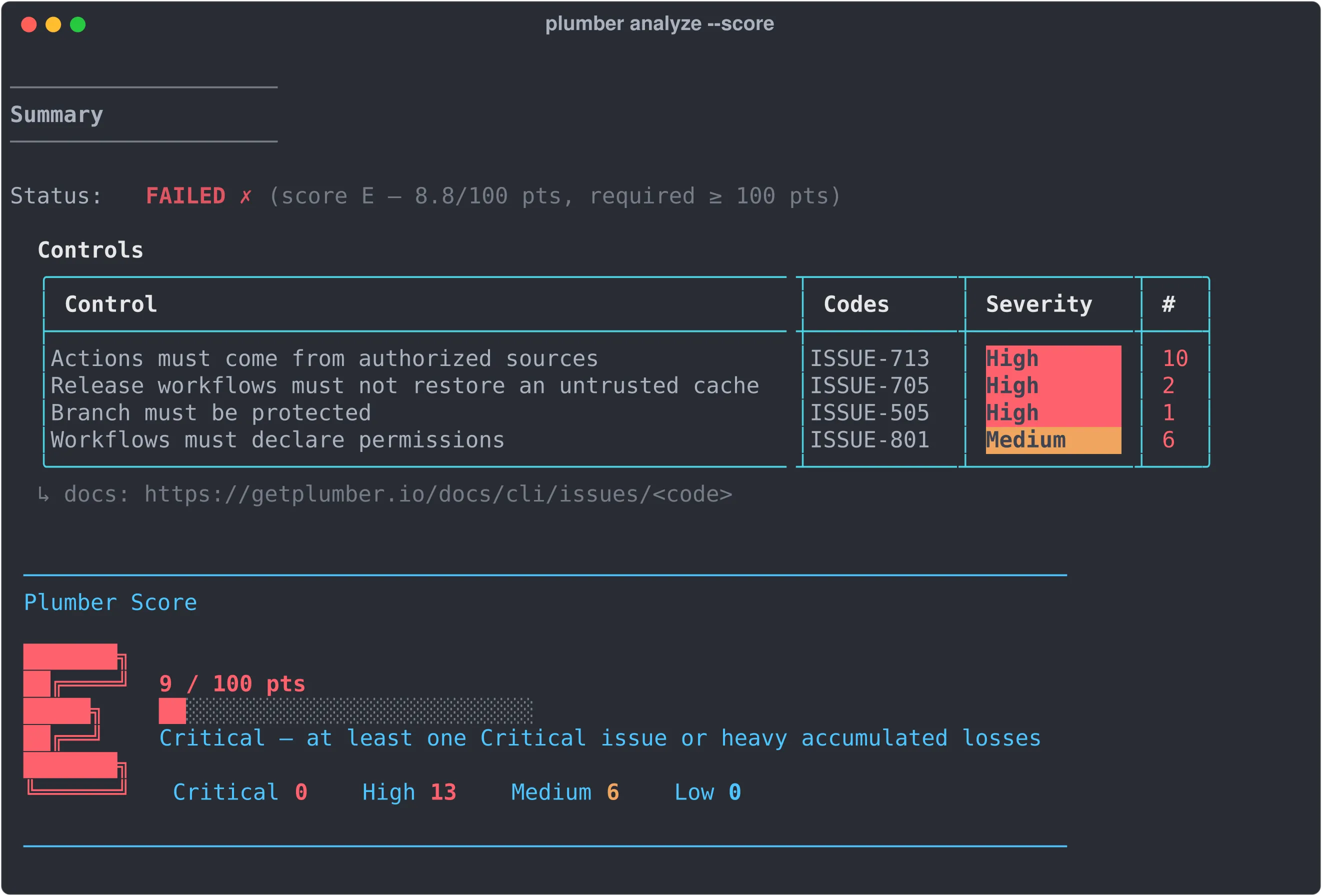
SummaryStatus: FAILED ✗ (score E - 8.8/100 pts, required ≥ 100 pts)
Controls- Actions must come from authorized sources     ISSUE-713  High    10- Release workflows must not restore an untrusted cache  ISSUE-705  High   2- Branch must be protected                      ISSUE-505  High     1- Workflows must declare permissions            ISSUE-801  Medium   6
Plumber Score: E  (9 / 100 pts)  Critical 0   High 13   Medium 6   Low 0
ISSUE-713 dominates here: ten third-party actions come from an unauthorised source (neither actions/*, nor github/*, nor an allowlist), even when they are pinned by SHA. ISSUE-705 is a recent addition to the supply chain family: it spots release workflows liable to consume a poisoned build cache. No Critical here, but the accumulation of High is enough to cap the score at E: the score gate requires 100 points by default, so the job fails.
If auto-detection does not work
The most frequent case is simple: the repository has no origin remote, or the remote URL points at neither GitLab nor GitHub.
Pass the parameters explicitly:
# Self-hosted GitLabplumber analyze --gitlab-url https://gitlab.com --project my-group/my-project
# GitHub Enterprise Serverplumber analyze --github-url https://github.example.com --project my-org/my-projectFrequent errors to fix first
Plumber documents 74 issue codes organised into nine families (see the appendix at the end of this guide). But on a project that has never been audited, the same four errors almost always dominate, whatever the provider. Start with those.
1. Container images not pinned by digest
On the pipeline-craft lab tested, Plumber reported:
HIGH [ISSUE-103] Job 'pytest' uses image without digest pinning: docker.io/python:3.12-slimHIGH [ISSUE-103] Job 'docker-build' uses image without digest pinning: docker.io/docker:27The problem is not only the use of latest. A version tag such as python:3.12-slim stays mutable: if the registry republishes the image, your pipeline may run something else tomorrow.
To turn on strict mode, the key sits in the v2.0 schema under the provider section:
version: "2.0"gitlab: controls: containerImageMustNotUseForbiddenTags: enabled: true containerImagesMustBePinnedByDigest: true2. Third-party actions not pinned by SHA (GitHub provider)
This is the most visible flaw the GitHub provider detects, now under the code ISSUE-701:
HIGH [ISSUE-701] job "…" references action "…@main" with a mutable ref - pin by commit SHA insteadA step whose uses: points at owner/action@v4 or owner/action@main stays mutable on the maintainer's side. If the action is compromised, as tj-actions/changed-files was in March 2025 (CVE-2025-30066), your workflow silently runs the modified code with its secrets.
Enable the control in the GitHub section:
github: controls: actionsMustBePinnedByCommitSha: enabled: true trustGithubOfficialActions: trueThe trustGithubOfficialActions option exempts first-party GitHub actions (actions/*, github/*) so the initial signal concentrates on the third-party surface, the one GitHub does not maintain.
3. Includes tracking main, master or HEAD (GitLab provider)
An include pointing at a mutable branch makes your pipeline hard to reproduce and can break with no change in your own repository.
include: - project: security/templates file: /pipelines/sast.yml ref: maininclude: - project: security/templates file: /pipelines/sast.yml ref: v2.4.1The matching control is includesMustNotUseForbiddenVersions, with ISSUE-404.
4. The main branch is not protected
If the default branch is not protected, a direct push or an unreviewed change can bypass your review and security practices. The control exists under both providers and returns ISSUE-501 (no protection) or ISSUE-505 (incomplete protection).
gitlab: controls: branchMustBeProtected: enabled: true defaultMustBeProtected: true namePatterns: - main allowForcePush: falseA fifth very common error: Docker-in-Docker
The lab also reported:
HIGH [ISSUE-412] job "docker-build" uses Docker-in-Docker service "docker:27-dind" ↳ at .gitlab-ci.yml:55 ↳ docs: https://getplumber.io/docs/cli/issues/ISSUE-412On shared runners, DinD raises the risk of container escape and lateral movement. If you build images, prefer Buildah. Kaniko remains usable through the maintenance fork chainguard-forks/kaniko, the original repository having been archived in June 2025: that is an exit route, not a target. The control also exists on the GitHub side with ISSUE-413 (insecure daemon mode).
The supply chain protections to enable next
Once the four basic errors are fixed, Plumber offers a 7XX family of controls dedicated to third-party actions, the most attacked surface of a GitHub workflow. These controls go beyond simple pinning and deserve to be enabled as soon as your pipeline is stable.
Restricting the authorised action sources (ISSUE-713)
Pinning an action by SHA guarantees that it does not change, but not that it comes from a trusted author. The githubActionMustComeFromAuthorizedSources control reports any action whose owner is neither GitHub, nor your organisation, nor on your allowlist. It is the direct counter to repository squatting or to an unknown third-party action inheriting your secrets.
github: controls: githubActionMustComeFromAuthorizedSources: enabled: true trustGithubOfficialActions: true trustSameOrgActions: true # Minimum star threshold (0 = disabled, requires the GitHub API) minimumStars: 0 trustedGithubActions: - docker/setup-buildx-action - docker/login-action - ossf/scorecard-actionBlocking actions carrying a known CVE (ISSUE-703)
The actionsMustNotCarryKnownCVEs control cross-checks every pinned action against published security advisories. A single vulnerable action comes back as Critical and, through the critical penalty, caps the overall score until it is fixed. The companion control actionsMustNotBeArchived (ISSUE-702) reports actions whose upstream repository is archived, and which will therefore never receive another fix.
github: controls: actionsMustNotCarryKnownCVEs: enabled: true actionsMustNotBeArchived: enabled: trueClosing the pull_request_target door (ISSUE-804)
The pullRequestTargetMustNotCheckoutHead control detects a workflow triggered by pull_request_target that checks out the HEAD of the pull request. That is exactly the pattern exploited by the tj-actions/changed-files compromise: the unmerged code of an outside contributor runs with the repository secrets.
github: controls: pullRequestTargetMustNotCheckoutHead: enabled: trueThe configuration file: the per-provider v2.0 schema
The v2.0 schema introduced in 0.3 organises controls by provider: everything about GitLab CI/CD lives under gitlab.controls:, everything about GitHub Actions lives under github.controls:. The v1 top-level controls: disappears, and so does the engine: block (the Rego engine is now the only one available and runs by default).
A minimal example to get started
This file enables four controls on the GitLab side and two on the GitHub side, which matches the most frequent errors described above. The version: "2.0" key is mandatory: it is what tells Plumber to expect the per-provider sections. A project using a single platform can drop the other section with no consequence.
version: "2.0"gitlab:  controls:    containerImageMustNotUseForbiddenTags:      enabled: true      tags:        - latest        - dev        - main      containerImagesMustBePinnedByDigest: true
    containerImageMustComeFromAuthorizedSources:      enabled: true      trustDockerHubOfficialImages: true      trustedUrls:        - $CI_REGISTRY_IMAGE:*        - registry.gitlab.com/security-products/*
    branchMustBeProtected:      enabled: true      defaultMustBeProtected: true      namePatterns:        - main      allowForcePush: false
    includesMustNotUseForbiddenVersions:      enabled: true      forbiddenVersions:        - latest        - main        - HEAD
github:  controls:    actionsMustBePinnedByCommitSha:      enabled: true      trustedOwners:        - actions        - github
    branchMustBeProtected:      enabled: true      defaultMustBeProtected: true      namePatterns:        - main
Migrating a v1 configuration in one command
If you are coming from an earlier version and your .plumber.yaml still uses the top-level controls:, plumber config migrate rewrites the file in the v2.0 schema, preserving comments and ordering:
# Creates .plumber.yaml.v2 next to the original fileplumber config migrate
# Or overwrite in place (the original goes to .plumber.yaml.bak)plumber config migrate --in-place
The migration wraps the existing controls: block under gitlab.controls:, upgrades version: "1.0" to "2.0" and removes the now obsolete engine: block. Any gitlab: or github: sections already present are left untouched.
Useful commands around the configuration
These four commands read as two groups: validate and view inspect what Plumber actually understands of your file, diff and generate compare it with the official template. Note the --force on the last one: without it, config generate refuses to overwrite an existing .plumber.yaml.
# Check the fileplumber config validate
# See the effective configuration, comments strippedplumber config view
# Compare the local configuration with the default (colourised output)plumber config diff
# Generate the full official template (gitlab: and github: sections)plumber config generate --output .plumber.yaml --force
plumber config diff appeared in 0.3 and shows at a glance what differs from the official template: green for what you added or changed, red for what you removed. Useful on a legacy project, before proposing a hardening pass.
Adding Plumber to GitLab CI with the official component
Once the first local scan makes sense, the right entry point on the GitLab side is the official CI/CD component.
The recommended quick start
First add the GITLAB_TOKEN token in Settings -> CI/CD -> Variables, then use this skeleton:
workflow:  rules:    - if: $CI_PIPELINE_SOURCE == "merge_request_event"    - if: $CI_COMMIT_BRANCH && $CI_OPEN_MERGE_REQUESTS      when: never    - if: $CI_COMMIT_BRANCH    - if: $CI_COMMIT_TAG
include:  - component: gitlab.com/getplumber/plumber/plumber@0.4.60
That workflow:rules block avoids creating both a branch pipeline and a merge request pipeline on the same push.
A customised variant
The inputs: block overrides the component defaults. The two settings that matter most are stage, which pulls the job out of the .pre mentioned just above, and min_points (or min_score), the Plumber Score threshold below which the job fails. The two PBOM paths trigger the inventory exports.
workflow:  rules:    - if: $CI_PIPELINE_SOURCE == "merge_request_event"    - if: $CI_COMMIT_BRANCH && $CI_OPEN_MERGE_REQUESTS      when: never    - if: $CI_COMMIT_BRANCH    - if: $CI_COMMIT_TAG
include: - component: gitlab.com/getplumber/plumber/plumber@0.4.60 inputs: stage: test min_points: 80 # fails below 80 points out of 100 (former threshold) config_file: .plumber.yaml pbom_file: plumber-pbom.json pbom_cyclonedx_file: plumber-cyclonedx-sbom.jsonThe component's configuration precedence
The component looks for the configuration in this order:
- the
config_fileinput if it is set; - the
.plumber.yamlfile at the root of the repository; - the default configuration embedded in the image.
What if you write a manual job?
Keep that variant for specific needs. If you want to add --mr-comment and --badge in a manual job, split them into two jobs: the merge request comment only makes sense in an MR pipeline, and the badge only updates on the default branch.
Self-hosted GitLab: the minimum to know
On a self-hosted GitLab, you cannot consume the component directly from gitlab.com. The correct path is the following:
-
Import the repository
https://gitlab.com/getplumber/plumber.gitinto your instance. -
Enable the CI/CD Catalog in the imported project.
-
Publish a release by running a pipeline on a tag you already imported, for example
v0.4.60. -
Then consume the local component in your pipelines.
include: - component: gitlab.example.com/infrastructure/plumber/plumber@0.4.60Exporting a PBOM and analysing it
Once you can read a scan, you can move on to the PBOM.
The PBOM (Pipeline Bill of Materials) is the inventory of your pipeline's dependencies: Docker images, GitLab components, templates and includes.
plumber analyze \ --pbom plumber-pbom.json \ --pbom-cyclonedx plumber-cyclonedx-sbom.jsonWhen to use each format?
The two files describe the same pipeline, but not for the same reader. The native PBOM keeps metadata specific to Plumber that no other tool knows how to interpret; CycloneDX loses that detail in favour of a format Trivy, Grype or Dependency-Track consume directly. Nothing stops you from producing both in the same run.
| Format | When to use it | What it contains |
|---|---|---|
| Native PBOM | You want to understand the pipeline in detail | Rich metadata specific to Plumber |
| CycloneDX | You want to plug in another tool | A standard format for Trivy, Grype or Dependency-Track |
Scanning the CycloneDX file with Trivy
The sbom subcommand takes the file as input without re-downloading the images; the --severity filter limits the output to the levels that warrant immediate action.
trivy sbom plumber-cyclonedx-sbom.json --severity HIGH,CRITICALScanning the CycloneDX file with Grype
The sbom: prefix tells Grype the argument is an inventory and not an image, and --fail-on high makes the command exit non-zero, which breaks the CI job as soon as a vulnerability of that level appears.
grype sbom:plumber-cyclonedx-sbom.json --fail-on highFeeding the findings into security dashboards
The PBOM inventories the pipeline; to push the compliance gaps into the
platforms, Plumber produces two standardised findings reports. You generate
them by adding a flag to plumber analyze.
--sarifwrites a report in the SARIF 2.1.0 format, consumed by GitHub Code Scanning (the repository's Security tab) and by GitLab's Security Dashboard.--glsastwrites a GitLab SAST report (gl-sast-report.json) that feeds the Security Dashboard and GitLab's merge request widget.
# SARIF report - GitHub Code Scanning or GitLab Security Dashboardplumber analyze --sarif plumber.sarif
# Native GitLab SAST report - merge request widgetplumber analyze --glsast gl-sast-report.json
In a manual GitLab job, declare the produced file as a sast report
artefact so GitLab shows it automatically in the merge request:
plumber-scan: # ... a script that runs "plumber analyze --glsast gl-sast-report.json" artifacts: reports: sast: gl-sast-report.jsonThese two formats do not replace reading the summary: they exist to keep a history of the findings and to line them up with the other security scanners already wired into your dashboards.
Going further after the first scan
At this point, you already know how to run Plumber and read the most useful errors. The features below are handy, but they should not be your entry point.
Understanding a code with plumber explain
This is the reflex command in front of an ISSUE-XXX you do not know: it works offline, with no configuration and no repository, and the ISSUE- prefix can be omitted.
plumber explain ISSUE-412# accepted shorthand: plumber explain 412The command returns the description of the problem, its impact, the remediation and the link to the official documentation. Three flags complete the usage:
# Compact list of the available codesplumber explain --list
# Exhaustive reference (description + remediation for every code)plumber explain --all
# JSON output, usable in a scriptplumber explain ISSUE-701 --json
Using the A-E score
Since 0.4, the Plumber Score is the only exit gate: it drives the job's return code through --min-points / --min-score, and it feeds the badge and the merge request comments. The --score flag shows the detail on screen (letter, points, bar, count by severity), and --score-point adds the full points breakdown.
plumber analyze --scoreplumber analyze --score-pointOn the nektos/act scan shown above, the result was:
Plumber Score: E (9 / 100 pts) Critical 0 High 13 Medium 6 Low 0The score is there to prioritise: it does not replace reading the failing controls. It applies per-code caps and per-severity weights, so the same number of issues does not mechanically produce the same grade. One Critical issue, or an accumulation of High as here, is enough to cap the points until it is fixed.
Targeting only certain controls
These two flags expect control names separated by commas, not issue codes. They serve to isolate a fix in progress; do not leave them in the CI job, or you stop measuring the controls you set aside.
# Images and branch protection onlyplumber analyze --controls containerImageMustNotUseForbiddenTags,branchMustBeProtected
# Everything except branch protectionplumber analyze --skip-controls branchMustBeProtected
Merge request comments and project badges
With the GitLab component, enable them like this:
include: - component: gitlab.com/getplumber/plumber/plumber@0.4.60 inputs: mr_comment: true badge: trueWhen should you move to the Platform?
The Platform is not the right starting point for a beginner. It becomes relevant when you need to:
- track several projects over time;
- have a centralised dashboard;
- manage policies shared across several teams;
- audit variables, quotas or merge request rules at a larger scale.
Appendix: the issue codes by family
Plumber v0.4.60 documents 74 issue codes organised into nine families, each with a description and a remediation reachable through plumber explain ISSUE-XXX. The numbering has evolved: third-party actions now have their own 7XX family, which holds 15 codes. The largest family is 4XX, with 18 codes. To get the exact list from your own installation, use:
# Compact list (one code per line)plumber explain --list
# Full reference (description + remediation for every code)plumber explain --all
# Detail of one code in JSON, usable in a scriptplumber explain ISSUE-701 --json
The table below gives the reading grid to identify quickly which family a reported issue belongs to:
| Family | Range | Covers | Examples |
|---|---|---|---|
| Container images | ISSUE-1XX (3 codes) | Sources, tags, digest | ISSUE-101 unauthorised source, ISSUE-102 forbidden tag, ISSUE-103 image not pinned by digest |
| Execution and expressions | ISSUE-2XX (14 codes) | Variables, injection, conditions, packages | ISSUE-203 debug trace, ISSUE-207 template injection, ISSUE-209 $GITHUB_ENV written, ISSUE-213 toJson(github) |
| Secrets and tokens | ISSUE-3XX (8 codes) | Leaks, secrets: inherit, tokens | ISSUE-302 secrets: inherit, ISSUE-307 persisted credentials, ISSUE-309 toJson(secrets) |
| Jobs, templates and structure | ISSUE-4XX (18 codes) | Jobs, includes, DinD, OIDC, naming | ISSUE-401 hardcoded job, ISSUE-404 mutable include, ISSUE-412 DinD, ISSUE-421 publish without OIDC, ISSUE-422 workflow with no name: |
| Branch protection and review | ISSUE-5XX (6 codes) | Branch protection, merge request approval rules | ISSUE-501 no protection, ISSUE-504 no approval rule on the protected branches, ISSUE-505 incomplete protection |
| GitLab security policy | ISSUE-6XX (1 code) | Linked security policy project | ISSUE-601 no security policy project, or the wrong one |
| Third-party actions (supply chain) | ISSUE-7XX (15 codes) | Pinning, sources, CVEs, archiving, remote code | ISSUE-701 action not pinned by SHA, ISSUE-703 known CVE, ISSUE-705 poisoned cache, ISSUE-713 unauthorised source, ISSUE-714 mutable remote code |
| Permissions and triggers | ISSUE-8XX (4 codes) | permissions:, triggers | ISSUE-801 no permissions:, ISSUE-802 dangerous trigger, ISSUE-804 booby-trapped pull_request_target |
| Repository hygiene | ISSUE-9XX (5 codes) | Dependabot, scanners, SECURITY.md | ISSUE-903 no update tool, ISSUE-904 no static scanner, ISSUE-905 no SECURITY.md |
The 7XX family is the most strategic one for the supply chain: it concentrates the protections against compromised third-party actions, the most attacked surface of a GitHub workflow. The 8XX and 9XX families are almost exclusively GitHub: they cover what the Actions ecosystem exposes as risks (GITHUB_TOKEN permissions, Dependabot, CI scanners, SECURITY.md).
Troubleshooting
Before going through the table, keep two points in mind: the v1 to v2 migration is needed as soon as your .plumber.yaml still uses the top-level controls:, and the GitHub provider relies on the gh CLI for authentication (no environment variable to export).
| Symptom | Likely cause | Fix |
|---|---|---|
| The scan runs without your configuration | No .plumber.yaml found, the embedded default is used (0.4.13+) | Normal; generate your own file with plumber config generate to adjust it |
unknown key 'controls' at root | Configuration still in the v1 schema | Run plumber config migrate to move to the v2.0 schema |
--threshold is deprecated warning | Gating still based on the percentage | Move to --min-points or --min-score (component: min_points / min_score) |
GITLAB_TOKEN environment variable is required | Variable missing on the GitLab provider | Export GITLAB_TOKEN before plumber analyze |
401 Unauthorized (GitLab) | Incomplete or invalid token | Check read_api + read_repository on the token |
| No GitHub authentication detected | No active gh session | Run gh auth login; Plumber then reads ~/.config/gh automatically |
403 Forbidden on MR comment | Insufficient scope | Use api if you enable mr_comment |
403 Forbidden on badge | Insufficient scope or too weak a role | Use api and a Maintainer role |
| The component does not run | Job in .pre with no other normal stage | Force stage: test |
| Two pipelines are created on the same push | workflow:rules missing | Add the block GitLab recommends |
| The project is not auto-detected | Git remote missing or misnamed | Check the origin remote, or pass --gitlab-url / --github-url and --project |
Check your understanding
Make sure the essentials of this guide are yours. The questions only cover what was explained here.
Knowledge check
Check what you have learned with this interactive quiz
How it works
- The timer starts when you click Start
- Multiple choice, true/false and short answer questions
- You can move between questions
- Detailed results are shown at the end
Starts the quiz and the timer
Review
(0/0)Skills profile
What to do next
Resources to go further
Hints before you try again?
A new full quiz with random questions
Work again only on the questions you missed
Key points
- Plumber scans the security of your GitLab CI/CD and GitHub Actions pipelines from the same CLI (v0.4.60; the GitLab component now follows the same version number)
- The beginner path is simple:
plumber analyzeworks with no configuration (embedded default since 0.4.13), thenconfig initandconfig validateto adjust it - The v2.0 schema splits the controls per provider (
gitlab.controls:/github.controls:);plumber config migrateconverts from v1 - The job fails through the Plumber Score:
--min-pointsor--min-score(component:min_points/min_score);--thresholdis deprecated - Start by fixing unpinned images, actions not pinned by SHA (ISSUE-701), mutable includes and unprotected branches
- Then enable the supply chain protections: authorised sources (ISSUE-713), known CVEs (ISSUE-703), booby-trapped
pull_request_target(ISSUE-804) - The PBOM inventories the pipeline; CycloneDX eases the integration with Trivy and Grype
- The
--sarifand--glsastreports push the findings into GitHub Code Scanning and the GitLab Security Dashboard - The score is the only exit gate (0.4): one Critical issue or an accumulation of High caps the points until it is fixed
- 74 issue codes in nine families; the exact list always comes from
plumber explain --liston your version - Keep the Platform for multi-project governance needs
FAQ: frequent questions
These questions come up systematically before adoption: what the tool does, what it costs, what it adds next to the scanners already in place, whether it touches your files and how it fails a pipeline.
Plumber is a security scanner for CI/CD pipelines. It analyses your GitLab CI/CD and GitHub Actions configurations to find supply chain weaknesses: actions not pinned by SHA, untrusted sources, exposed secrets, unprotected branches.
It returns a Plumber Score (A-E and points out of 100) plus a findings report your dashboards can consume, and it can export a PBOM (an inventory of the pipeline).
The CLI and the GitLab component covered by this guide are usable from the command line and in a pipeline.
The Platform (multi-project dashboard, history, governance) is a separate product, relevant only when you steer a portfolio of projects.
Trivy scans images and SBOMs for CVEs. zizmor targets GitHub Actions workflows specifically.
Plumber covers both platforms (GitLab and GitHub) under a single configuration, produces an A-E score and a PBOM, and focuses on the posture of the pipeline rather than on dependency vulnerabilities.
The three are complementary: Plumber can export a CycloneDX file that Trivy or Grype then analyses.
No. Plumber reads and analyses your configuration, it does not rewrite it.
The fixes (pinning an action by SHA, adding a permissions: block, protecting a branch) stay in your hands. It is a detector, not an automatic fixer.
Since 0.4, gating rests on the Plumber Score, no longer on a compliance percentage.
- On the CLI:
--min-points(0-100) or--min-score(A-E). - In the GitLab component: the
min_points/min_scoreinputs.
plumber analyze --min-points 80   # fails below 80 points out of 100
plumber analyze --min-score B     # fails below a B
The old --threshold is deprecated. The default is min-points: 100: a single issue fails the job.
Next steps
- Securing CI/CD pipelines: the hardening practices that extend the findings Plumber reports.
- Supply chain attacks on GitHub Actions: the attacks behind the issue families detected here.
- zizmor: the complementary scanner, dedicated to GitHub Actions workflows.