

You probably use GitHub actions such as actions/checkout@v4 in your
workflows. That @v4 looks harmless, yet it is a security hole that has
already enabled real attacks. This guide explains why, and how to protect
yourself.
What you will learn
- Understand the danger of moving tags (
@v4,@main,@latest) - Recognise a tag-moving attack, the
tj-actions/changed-filesway - Pin an action to its commit SHA, with a version comment
- Find the SHA of an action through the API, the CLI or the GitHub interface
- Automate the conversion and the updates with
pin-github-actionand Dependabot - Check how well pinning covers a whole repository
What is wrong with @v4?
The @v4 suffix seen everywhere in workflows names a Git tag. Behind that
harmless habit hides a moving reference, a structural weakness this section
takes apart, first through an image, then in technical terms.
In technical terms
A Git tag such as @v4 is simply a label stuck on a commit. The problem?
That label moves: anyone with access to the repository can shift it to
another commit.
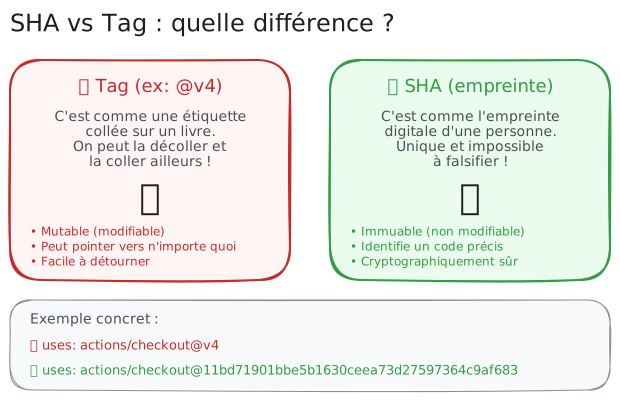
❌ Tag (@v4)
- It is a moving label
- It can point at any code
- The maintainer (or an attacker) can change it
✅ SHA (fingerprint)
- It is a cryptographic fingerprint
- It identifies one precise, unique piece of code
- It cannot be changed or forged
How does the attack unfold?
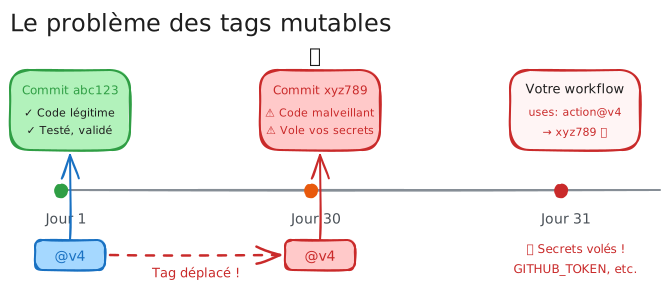
This is not science fiction. In March 2025, the popular action tj-actions/changed-files was compromised in exactly this way.
-
Day 1: you use
action/example@v4, which points at commitabc123, legitimate code, tested and reviewed. -
Day 30: an attacker compromises the maintainer's account (phishing, weak password, stolen token, and so on).
-
The attacker moves the tag:
@v4now points at a new commitxyz789holding malicious code. -
Day 31: your workflow runs. It fetches
@v4, and runs the malicious code without you noticing anything. -
Result: your secrets (
GITHUB_TOKEN, API keys, credentials) are exfiltrated to the attacker.
The fix: pin to a SHA
Instead of trusting a moving label, use the cryptographic fingerprint (the SHA) of the commit. It is like handing over the exact fingerprint of the code you want to run.
# ❌ Dangerous: a mutable tag, it can change at any moment- uses: actions/checkout@v4
# ✅ Safe: an immutable SHA, always the same code- uses: actions/checkout@11bd71901bbe5b1630ceea73d27597364c9af683 # v4.2.2
Why the # v4.2.2 comment? It records which version that SHA corresponds
to. It is purely informative, for you and for Dependabot, but the SHA is what
carries the security.
How do you find the SHA of an action?
You now know why to use a SHA. How do you find it? Several methods exist, from the simplest to the most automated.
Method 1: through the GitHub API (fast)
The most direct request queries the GitHub REST API: it returns the commit SHA behind any tag, with nothing to install.
# Get the SHA of tag v4.2.2 of the checkout actioncurl -s https://api.github.com/repos/actions/checkout/commits/v4.2.2 \ | jq -r .shaExpected result: 11bd71901bbe5b1630ceea73d27597364c9af683
Method 2: through the GitHub CLI (if installed)
If the gh CLI is installed and authenticated, a single call is enough: it
handles authentication and extracts the SHA without curl or jq.
gh api repos/actions/checkout/commits/v4.2.2 --jq .shaMethod 3: through the web interface
Without a terminal, the GitHub interface gives you the SHA in a few clicks from the repository's releases page.
- Open the action's repository (for example
github.com/actions/checkout) - Click the Releases tab in the sidebar
- Find the version you want (for example v4.2.2)
- Click the link to the associated commit
- Copy the full SHA (40 characters) from the URL or the page
Automate the pinning (do not do it by hand)
Converting each action manually would be tedious and error-prone. Fortunately, tools do the work for you.
Option 1: pin-github-action (command line)
This tool parses your workflows and replaces tags with their SHAs automatically:
# Install the toolnpm install -g pin-github-action
# Convert a single workflowpin-github-action .github/workflows/ci.yml
# Convert EVERY workflow at oncefind .github/workflows -name "*.yml" -exec pin-github-action {} \;
Before (vulnerable):
- uses: actions/checkout@v4 # ❌ mutable tag- uses: actions/setup-node@49933ea5288caeca8642d1e84afbd3f7d6820020 # v4After (secured):
- uses: actions/checkout@3d3c42e5aac5ba805825da76410c181273ba90b1 # v7.0.1- uses: actions/setup-node@820762786026740c76f36085b0efc47a31fe5020 # v7.0.0Option 2: StepSecurity (web interface)
If you prefer a graphical interface, app.stepsecurity.io offers a simple path:
- Paste your workflow YAML into the interface
- The tool converts every tag into a SHA automatically
- Copy the secured result
- Replace your workflow file
Bonus: StepSecurity also reviews other security aspects of your workflows (permissions, exposed secrets, and so on).
Keeping the SHAs current (without effort)
A pinned SHA is good. But actions receive security fixes and new features. How do you stay current without going back to mutable tags?
Solution 1: Dependabot (recommended)
Dependabot watches your dependencies and opens pull requests automatically when new versions land:
version: 2updates: - package-ecosystem: "github-actions" directory: "/" schedule: interval: "weekly" cooldown: default-days: 7 # Quarantine: never a release published the same day # Checks every week commit-message: prefix: "ci" # Commit prefix: "ci: ..."How it works: Dependabot reads the # v4.2.2 comment in your workflows.
When v4.2.3 ships, it opens a pull request updating both the SHA and the
comment. All you have to do is review and merge.
Solution 2: Renovate (an alternative)
Renovate is an alternative to Dependabot with more configuration options:
{ "$schema": "https://docs.renovatebot.com/renovate-schema.json", "extends": ["config:recommended"], "github-actions": { "enabled": true, "pinDigests": true }}Checking that everything is pinned
How do you know whether your workflows are properly secured? The OpenSSF Scorecard tool analyses your repository and grades your security practices:
scorecard --local . --checks Pinned-Dependencies --show-detailsReading the score:
| Score | Meaning |
|---|---|
| 10/10 | Perfect. Every action is pinned by SHA |
| 5-9/10 | Some actions still use tags |
| 0/10 | Danger. Mutable tags everywhere (@v1, @latest, @main) |
Do we pin the official GitHub actions too?
Yes. Even though the actions GitHub maintains (actions/*) are more
trustworthy than third-party ones, pinning remains good practice:
| Action | Use | Why pin it |
|---|---|---|
actions/checkout | Clone the repository | It has access to your source code |
actions/setup-node | Install Node.js | It runs scripts on the runner |
actions/setup-python | Install Python | Same |
actions/cache | Cache dependencies | It manipulates files |
actions/upload-artifact | Save artefacts | It has access to the produced files |
actions/download-artifact | Retrieve artefacts | It can inject files |
The principle: any code running in your CI deserves to be verified and pinned, whatever its source.
Third-party actions: how do you assess the risk?
Not all actions are equal. Before adding a third-party action to your workflows, ask yourself these questions:
✅ Positive signals
- Many stars and users
- Regular commits, issues handled
- Maintained by a known organisation
- Readable, documented source code
- Releases with a changelog
⚠️ Warning signs
- Few stars, no maintenance
- Asks for
permissions: write-all - No tagged releases
- Obfuscated or minified code
- Maintained by an anonymous account
A complete example: a secured workflow
Here is a workflow applying every good practice:
name: CI
# No permission by default: each job asks for what it needspermissions: {}
on:  push:    branches: [main]  pull_request:
jobs:  build:    runs-on: ubuntu-24.04    permissions:      contents: read    steps:      # Every action is pinned by SHA      - name: Check out the code        uses: actions/checkout@11bd71901bbe5b1630ceea73d27597364c9af683 # v4.2.2        with:          persist-credentials: false
      - name: Install Node.js        uses: actions/setup-node@49933ea5288caeca8642d1e84afbd3f7d6820020 # v4.4.0        with:          node-version: '20'          cache: 'npm'
      - name: Install the dependencies        run: npm ci
      - name: Run the tests        run: npm test
      - name: Publish the coverage report        uses: actions/upload-artifact@ea165f8d65b6e75b540449e92b4886f43607fa02 # v4.6.2        with:          name: coverage          path: coverage/
What makes this workflow secure:
permissions: {}at the workflow level,contents: readgranted only to the job that needs it- Every action pinned by SHA, with a version comment
persist-credentials: falseonactions/checkout, so theGITHUB_TOKENdoes not stay in the git configuration- Version comments that Dependabot can act on
- No dubious third-party action
Recap: three steps to secure your workflows
Three concrete actions are enough to move from a vulnerable repository to pinned and maintained workflows.
-
Convert every workflow with
pin-github-actionor StepSecurity -
Configure Dependabot to keep the SHAs current automatically
-
Check regularly with Scorecard that nothing was forgotten
Check your understanding
Make sure the essentials of this guide are yours. The questions only cover what was explained here.
Knowledge check
Check what you have learned with this interactive quiz
How it works
- The timer starts when you click Start
- Multiple choice, true/false and short answer questions
- You can move between questions
- Detailed results are shown at the end
Starts the quiz and the timer
Review
(0/0)Skills profile
What to do next
Resources to go further
Hints before you try again?
A new full quiz with random questions
Work again only on the questions you missed
Key points
- A Git tag (
@v4,@main,@latest) is a moving reference: the maintainer, or an attacker, can shift it to any code. - The
tj-actions/changed-filesattack of March 2025 exploited exactly that mechanism to exfiltrate the secrets of thousands of pipelines. - Pinning an action to its commit SHA (40 characters) guarantees the pipeline always runs the same verified code.
- The
# v4.2.2comment after the SHA is informative: it lets Dependabot offer version updates. - You do not pin by hand:
pin-github-actionor StepSecurity convert the workflows, Dependabot or Renovate keep the SHAs current. - The official
actions/*actions get pinned too; any code running in CI deserves to be frozen.
Next steps
- Auditing with zizmor: automatically spotting the actions still sitting on a mutable tag across all your workflows.
- Scanning with poutine: extending the pinning check to a whole organisation, repository by repository.
- Security checklist: placing pinning among the other checks to pass before merging.