

Automatiser le cycle de vie des charts Helm en CI/CD garantit la qualité (lint, tests), la reproductibilité (versioning automatique), et la traçabilité (qui a publié quoi, quand). Ce module présente une pipeline complète avec GitLab CI et GitHub Actions, ainsi que les patterns de promotion dev → staging → prod.
Prérequis
Section intitulée « Prérequis »- Un repo Git contenant vos charts
- Accès à un registry OCI (Harbor, GHCR, ECR)
- Module 10 — OCI registries
- Module 11 — Provenance (optionnel)
Ce que vous allez apprendre
Section intitulée « Ce que vous allez apprendre »- Architecture d’une pipeline Helm
- Étape 1 : Lint et validation
- Étape 2 : Tests de chart
- Étape 3 : Package et versioning
- Étape 4 : Publish sur registry
- Promotion multi-environnements
- Intégration GitOps
Architecture d’une pipeline Helm
Section intitulée « Architecture d’une pipeline Helm »Workflow standard
Section intitulée « Workflow standard »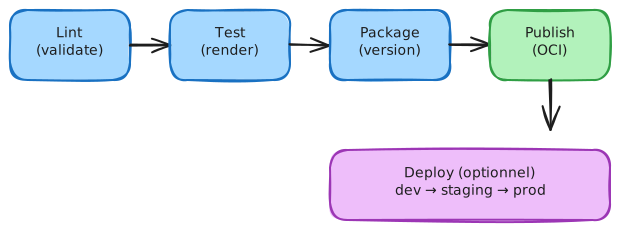
Ce que fait chaque étape
Section intitulée « Ce que fait chaque étape »| Étape | Outils | Objectif |
|---|---|---|
| Lint | helm lint, ct lint | Syntaxe YAML, bonnes pratiques |
| Test | helm template, kubeval, kubeconform | Manifests K8s valides |
| Package | helm package | Créer le .tgz versionné |
| Publish | helm push | Pousser sur registry OCI |
| Deploy | helm upgrade --install ou GitOps | Déployer sur cluster |
Étape 1 : Lint et validation
Section intitulée « Étape 1 : Lint et validation »helm lint (basique)
Section intitulée « helm lint (basique) »# Lint un charthelm lint ./charts/my-app
# Lint strict (warnings = erreurs)helm lint ./charts/my-app --strictChart Testing (ct) — recommandé
Section intitulée « Chart Testing (ct) — recommandé »Chart Testing (ct) est l’outil officiel pour tester des charts en CI :
# Installer ctpip install chart-testing
# Lint tous les charts modifiésct lint --config .ct.yaml
# Lint tous les chartsct lint --all --config .ct.yaml
Configuration .ct.yaml :
chart-dirs: - chartsvalidate-maintainers: falsevalidate-chart-schema: truelint-conf: - --strictValidation du schema (values)
Section intitulée « Validation du schema (values) »# Si values.schema.json existehelm lint ./charts/my-app # Valide automatiquement les valuesÉtape 2 : Tests de chart
Section intitulée « Étape 2 : Tests de chart »helm template (rendu local)
Section intitulée « helm template (rendu local) »# Générer les manifests sans clusterhelm template my-app ./charts/my-app -f values-test.yaml > rendered.yaml
# Vérifier que ça génère du YAML validehelm template my-app ./charts/my-app > /dev/nullecho $? # 0 = OKValidation des manifests K8s
Section intitulée « Validation des manifests K8s »# Installer kubeconform (rapide, maintenu)# https://github.com/yannh/kubeconform
helm template my-app ./charts/my-app | kubeconform -strict -summary# Installer kubeval# https://github.com/instrumenta/kubeval
helm template my-app ./charts/my-app | kubeval --strictTests helm (intégration)
Section intitulée « Tests helm (intégration) »Si votre chart définit des tests dans templates/tests/ :
# Déployer puis testerhelm install my-app ./charts/my-app -n test --waithelm test my-app -n testhelm uninstall my-app -n testÉtape 3 : Package et versioning
Section intitulée « Étape 3 : Package et versioning »Versioning automatique
Section intitulée « Versioning automatique »Option 1 : Version depuis Chart.yaml (manuelle)
version: 1.2.3 # Incrémenter manuellementappVersion: "2.0.0"Option 2 : Version depuis Git tag
# Récupérer la version depuis le tag GitVERSION=$(git describe --tags --abbrev=0 2>/dev/null || echo "0.0.0")
# Remplacer dans Chart.yamlsed -i "s/^version:.*/version: $VERSION/" charts/my-app/Chart.yaml
# Packagerhelm package ./charts/my-app
Option 3 : Semantic Release
# .releaserc.yaml pour semantic-releaseplugins: - "@semantic-release/commit-analyzer" - "@semantic-release/release-notes-generator" - ["@semantic-release/exec", { "prepareCmd": "sed -i 's/^version:.*/version: ${nextRelease.version}/' charts/my-app/Chart.yaml" }]Package avec métadonnées
Section intitulée « Package avec métadonnées »# Packagerhelm package ./charts/my-app
# Résultat : my-app-1.2.3.tgzÉtape 4 : Publish sur registry
Section intitulée « Étape 4 : Publish sur registry »Push OCI
Section intitulée « Push OCI »# Login (une fois par job)echo "$REGISTRY_PASSWORD" | helm registry login $REGISTRY_URL -u $REGISTRY_USER --password-stdin
# Pushhelm push my-app-1.2.3.tgz oci://$REGISTRY_URL/chartsVérification post-push
Section intitulée « Vérification post-push »# Vérifier que le chart est accessiblehelm show chart oci://$REGISTRY_URL/charts/my-app --version 1.2.3Pipeline complète GitLab CI
Section intitulée « Pipeline complète GitLab CI »stages: - lint - test - package - publish
variables: HELM_VERSION: "3.14.0" CHART_PATH: "charts/my-app" REGISTRY_URL: "harbor.example.com/charts"
.helm-base: image: alpine/helm:${HELM_VERSION} before_script: - helm version
lint: extends: .helm-base stage: lint script: - helm lint ${CHART_PATH} --strict - helm template test ${CHART_PATH} > /dev/null rules: - if: $CI_PIPELINE_SOURCE == "merge_request_event" - if: $CI_COMMIT_BRANCH == $CI_DEFAULT_BRANCH
test: extends: .helm-base stage: test image: alpine:latest before_script: - apk add --no-cache helm curl - curl -sL https://github.com/yannh/kubeconform/releases/latest/download/kubeconform-linux-amd64.tar.gz | tar xz - mv kubeconform /usr/local/bin/ script: - helm template test ${CHART_PATH} | kubeconform -strict -summary rules: - if: $CI_PIPELINE_SOURCE == "merge_request_event" - if: $CI_COMMIT_BRANCH == $CI_DEFAULT_BRANCH
package: extends: .helm-base stage: package script: # Version depuis le tag Git ou CI_COMMIT_TAG - | if [ -n "$CI_COMMIT_TAG" ]; then VERSION=$CI_COMMIT_TAG else VERSION="0.0.0-${CI_COMMIT_SHORT_SHA}" fi - sed -i "s/^version:.*/version: $VERSION/" ${CHART_PATH}/Chart.yaml - helm package ${CHART_PATH} artifacts: paths: - "*.tgz" expire_in: 1 week rules: - if: $CI_COMMIT_TAG - if: $CI_COMMIT_BRANCH == $CI_DEFAULT_BRANCH
publish: extends: .helm-base stage: publish script: - echo "${REGISTRY_PASSWORD}" | helm registry login ${REGISTRY_URL} -u ${REGISTRY_USER} --password-stdin - helm push *.tgz oci://${REGISTRY_URL} dependencies: - package rules: - if: $CI_COMMIT_TAGPipeline complète GitHub Actions
Section intitulée « Pipeline complète GitHub Actions »name: Helm CI/CD
on: push: branches: [main] tags: ['v*'] pull_request: branches: [main]
env: CHART_PATH: charts/my-app REGISTRY: ghcr.io REGISTRY_PATH: ${{ github.repository_owner }}/charts
jobs: lint: runs-on: ubuntu-latest steps: - uses: actions/checkout@v4
- name: Set up Helm uses: azure/setup-helm@v3 with: version: '3.14.0'
- name: Lint chart run: | helm lint ${{ env.CHART_PATH }} --strict helm template test ${{ env.CHART_PATH }} > /dev/null
test: runs-on: ubuntu-latest needs: lint steps: - uses: actions/checkout@v4
- name: Set up Helm uses: azure/setup-helm@v3
- name: Install kubeconform run: | curl -sL https://github.com/yannh/kubeconform/releases/latest/download/kubeconform-linux-amd64.tar.gz | tar xz sudo mv kubeconform /usr/local/bin/
- name: Validate manifests run: helm template test ${{ env.CHART_PATH }} | kubeconform -strict -summary
publish: runs-on: ubuntu-latest needs: test if: startsWith(github.ref, 'refs/tags/v') permissions: contents: read packages: write steps: - uses: actions/checkout@v4
- name: Set up Helm uses: azure/setup-helm@v3
- name: Get version from tag id: version run: echo "VERSION=${GITHUB_REF#refs/tags/v}" >> $GITHUB_OUTPUT
- name: Update Chart.yaml version run: | sed -i "s/^version:.*/version: ${{ steps.version.outputs.VERSION }}/" ${{ env.CHART_PATH }}/Chart.yaml
- name: Package chart run: helm package ${{ env.CHART_PATH }}
- name: Login to GHCR run: echo "${{ secrets.GITHUB_TOKEN }}" | helm registry login ${{ env.REGISTRY }} -u ${{ github.actor }} --password-stdin
- name: Push chart run: helm push *.tgz oci://${{ env.REGISTRY }}/${{ env.REGISTRY_PATH }}Promotion multi-environnements
Section intitulée « Promotion multi-environnements »Pattern : même chart, values différents
Section intitulée « Pattern : même chart, values différents »Répertoirecharts/
Répertoiremy-app/
- Chart.yaml
- values.yaml Defaults
Répertoiretemplates/
- …
Répertoirevalues/
- values-dev.yaml Dev overrides
- values-staging.yaml
- values-prod.yaml
Déploiement par environnement
Section intitulée « Déploiement par environnement »# Dev (automatique sur main)helm upgrade --install my-app oci://registry/charts/my-app \ --version 1.2.3 \ -f values/values-dev.yaml \ -n dev
# Staging (manuel ou tag)helm upgrade --install my-app oci://registry/charts/my-app \ --version 1.2.3 \ -f values/values-staging.yaml \ -n staging
# Prod (approval + tag)helm upgrade --install my-app oci://registry/charts/my-app \ --version 1.2.3 \ -f values/values-prod.yaml \ -n prodPipeline avec gates
Section intitulée « Pipeline avec gates »# GitLab CI - promotion avec approvaldeploy-staging: stage: deploy script: - helm upgrade --install my-app oci://${REGISTRY}/my-app --version ${VERSION} -f values/values-staging.yaml -n staging environment: name: staging rules: - if: $CI_COMMIT_TAG
deploy-prod: stage: deploy script: - helm upgrade --install my-app oci://${REGISTRY}/my-app --version ${VERSION} -f values/values-prod.yaml -n prod environment: name: production when: manual # Approval requis rules: - if: $CI_COMMIT_TAGIntégration GitOps
Section intitulée « Intégration GitOps »Argo CD avec Helm
Section intitulée « Argo CD avec Helm »# Application Argo CDapiVersion: argoproj.io/v1alpha1kind: Applicationmetadata: name: my-app namespace: argocdspec: project: default source: repoURL: oci://harbor.example.com/charts chart: my-app targetRevision: 1.2.3 helm: valueFiles: - values-prod.yaml destination: server: https://kubernetes.default.svc namespace: prod syncPolicy: automated: prune: true selfHeal: trueFlux avec HelmRelease
Section intitulée « Flux avec HelmRelease »# HelmRelease FluxapiVersion: helm.toolkit.fluxcd.io/v2beta1kind: HelmReleasemetadata: name: my-app namespace: prodspec: interval: 5m chart: spec: chart: my-app version: "1.2.3" sourceRef: kind: HelmRepository name: my-charts namespace: flux-system values: replicaCount: 3 # ... prod valuesLab C3 — Pipeline CI/CD complète
Section intitulée « Lab C3 — Pipeline CI/CD complète »Objectif : Créer une pipeline qui lint, package et publie un chart sur push vers main ou tag.
-
Structure du repo
Fenêtre de terminal mkdir helm-cicd-lab && cd helm-cicd-labgit init# Créer un chartmkdir -p chartshelm create charts/my-app# Créer les values par envmkdir -p valuescp charts/my-app/values.yaml values/values-dev.yamlcp charts/my-app/values.yaml values/values-prod.yaml -
Créer la pipeline (GitLab ou GitHub selon votre environnement)
Copier le fichier
.gitlab-ci.ymlou.github/workflows/helm.ymlci-dessus. -
Configurer les secrets
-
GitLab : Settings → CI/CD → Variables
REGISTRY_URLREGISTRY_USERREGISTRY_PASSWORD
-
GitHub : Settings → Secrets and variables → Actions
GITHUB_TOKENest automatique pour GHCR
-
-
Pousser et déclencher
Fenêtre de terminal git add .git commit -m "feat: initial chart"git push origin main# Créer un tag pour publishgit tag v0.1.0git push origin v0.1.0 -
Vérifier
- Pipeline lint/test passe
- Chart publié sur le registry
helm show chart oci://registry/charts/my-app --version 0.1.0
Critères de réussite :
- Pipeline déclenchée sur push
-
helm lintexécuté sans erreur - Manifests validés avec kubeconform
- Chart packagé et versionné depuis le tag
- Publication automatique vers registry OCI
À retenir
Section intitulée « À retenir »- Lint :
helm lint --strict+ct lintpour la qualité - Test :
helm template+kubeconformpour valider les manifests - Package : versioning automatique depuis Git tag
- Publish :
helm pushvers registry OCI - Promotion : même chart, values différents par environnement
- GitOps : Argo CD / Flux pour les déploiements prod (recommandé)