

Votre pipeline a 50 jobs et devient ingérable ? Les pipelines parent-enfant permettent de découper un pipeline complexe en sous-pipelines indépendants. Le parent orchestre, les enfants exécutent.
Ce guide est fait pour vous si…
Section intitulée « Ce guide est fait pour vous si… »Ce que vous allez apprendre
Section intitulée « Ce que vous allez apprendre »À la fin de ce module, vous saurez :
- Déclencher un pipeline enfant :
trigger: includeavec un fichier local - Contrôler l’attente :
strategy: dependvsstrategy: mirror - Passer des variables : explicites ou via dotenv
- Partager des artefacts :
needs:pipeline:jobentre parent et enfant - Déclencher multi-projet :
trigger: projectvers un autre repo - Organiser un monorepo : un pipeline par composant
Prérequis
Section intitulée « Prérequis »Avant de continuer, assurez-vous de maîtriser :
Pourquoi des pipelines parent-enfant ?
Section intitulée « Pourquoi des pipelines parent-enfant ? »Le problème : un pipeline monolithique
Section intitulée « Le problème : un pipeline monolithique »Sans découpage, votre .gitlab-ci.yml ressemble à ça :
# ❌ Un fichier de 500 lignes avec TOUT dedansbuild_frontend: script: npm run buildbuild_backend: script: go buildbuild_api: script: python setup.pytest_frontend: script: npm testtest_backend: script: go testtest_api: script: pytestdeploy_frontend: # ... et ça continueProblèmes concrets :
- Maintenance : Qui est responsable de quoi ? Tout le monde modifie le même fichier.
- Lisibilité : 50 jobs dans un seul fichier = cauchemar à débugger.
- Performance : Le backend n’a pas changé ? Dommage, on le rebuild quand même.
- Isolation : Le test frontend échoue ? Impossible de déployer le backend qui est OK.
La solution : diviser pour mieux régner
Section intitulée « La solution : diviser pour mieux régner »| Sans parent-enfant | Avec parent-enfant |
|---|---|
Un seul .gitlab-ci.yml géant | Fichiers séparés par composant |
| Difficile à maintenir | Responsabilité claire (l’équipe front gère frontend/.gitlab-ci.yml) |
| Tout s’exécute toujours | Exécution conditionnelle par composant |
| Un échec bloque tout | Isolation des problèmes |
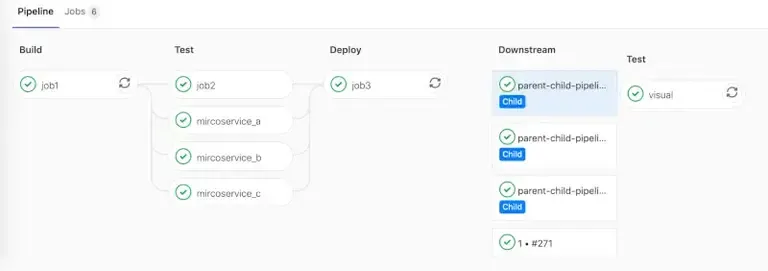
Configuration de base
Section intitulée « Configuration de base »C’est quoi un “trigger” ?
Section intitulée « C’est quoi un “trigger” ? »Un trigger est un job spécial qui ne fait qu’une chose : lancer un autre pipeline. Il ne contient pas de script: — juste une instruction trigger: qui dit “à ce moment, démarre ce pipeline enfant”.
Pipeline parent : le chef d’orchestre
Section intitulée « Pipeline parent : le chef d’orchestre »Le fichier .gitlab-ci.yml à la racine du projet contient uniquement des jobs de déclenchement :
# .gitlab-ci.yml (racine du projet)
stages:  - triggers         # Un seul stage : déclencher les enfants
# 🎭 Job qui déclenche le pipeline frontendtrigger_frontend:  stage: triggers  trigger:                              # 👈 Mot-clé magique : ce n'est pas un job normal    include: frontend/.gitlab-ci.yml    # 👈 Chemin vers le fichier CI de l'enfant    strategy: depend                    # 👈 "Attends que l'enfant finisse"
# 🎭 Job qui déclenche le pipeline backendtrigger_backend:  stage: triggers  trigger:    include: backend/.gitlab-ci.yml    strategy: depend
Décortiquons :
trigger:— Ce mot-clé transforme le job en “lanceur de pipeline”. Pas descript:, pas deimage:.include: frontend/.gitlab-ci.yml— Le chemin du fichier CI enfant, relatif à la racine du repo.strategy: depend— Le parent attend la fin de l’enfant avant de continuer. Sans ça, il passe immédiatement au job suivant.
Pipeline enfant : un pipeline normal
Section intitulée « Pipeline enfant : un pipeline normal »Le fichier enfant est un .gitlab-ci.yml classique. Il ne sait même pas qu’il est “enfant” — il s’exécute normalement :
stages:  - build  - test
build:  stage: build  image: node:20                        # Son propre environnement  script:    - npm ci    - npm run build  artifacts:    paths:      - dist/
test:  stage: test  image: node:20  script:    - npm test
Avantage : L’équipe frontend peut modifier ce fichier sans toucher au reste. Chaque composant a son propre “mini-pipeline”.
Options de trigger
Section intitulée « Options de trigger »include : fichier local
Section intitulée « include : fichier local »La forme la plus simple — l’enfant est un fichier dans le même repo :
trigger_job: trigger: include: path/to/child.yml # Chemin relatif depuis la racine du repostrategy: depend — le paramètre le plus important
Section intitulée « strategy: depend — le paramètre le plus important »Sans strategy: depend, voici ce qui se passe :
Parent : trigger_frontend → ✅ success (immédiatement !)Enfant : → build → test → ❌ échoueRésultat : le parent est VERT alors que l'enfant a échoué !Avec strategy: depend :
Parent : trigger_frontend → ⌛ attend...Enfant : → build → test → ❌ échoueRésultat : le parent passe en ❌ échec aussitrigger_job: trigger: include: child.yml strategy: depend # ✅ Attend la fin et hérite du statutstrategy: depend vs strategy: mirror — quelle différence ?
Section intitulée « strategy: depend vs strategy: mirror — quelle différence ? »Les deux attendent l’enfant, mais diffèrent sur les cas limites :
| Situation | depend | mirror |
|---|---|---|
| Enfant réussit | Parent ✅ | Parent ✅ |
| Enfant échoue | Parent ❌ | Parent ❌ |
| Enfant annulé (cancel) | Parent ❌ (failed) | Parent ⏹ (cancelled) |
| Enfant en warning | Parent ✅ | Parent ⚠️ (warning) |
En pratique :
depend: le plus courant, convient à 99% des casmirror: reflet exact du statut enfant (utile avec les pipelines auto-cancelés)
trigger_job: trigger: include: child.yml strategy: mirror # Miroir strict du statut enfantforward : transmettre automatiquement les variables
Section intitulée « forward : transmettre automatiquement les variables »Par défaut, l’enfant ne reçoit pas les variables du parent. Avec forward:, vous pouvez transmettre automatiquement :
trigger_job: trigger: include: child.yml forward: yaml_variables: true # Variables définies dans le YAML parent pipeline_variables: true # Variables passées via l'interface web ou APIQuand utiliser forward: ?
- Vous avez beaucoup de variables à passer
- Vous voulez que l’enfant hérite du contexte complet du parent
Quand utiliser variables: explicites ? (voir section suivante)
- Vous voulez contrôler précisément ce qui est passé
- Vous avez besoin de renommer ou transformer des variables
Passer des variables à l’enfant
Section intitulée « Passer des variables à l’enfant »Le problème : l’enfant est isolé
Section intitulée « Le problème : l’enfant est isolé »Un pipeline enfant s’exécute dans son propre contexte. Il ne voit pas automatiquement les variables du parent. Si le parent connaît la version à déployer (VERSION=1.2.3), comment la transmettre ?
Méthode 1 : Variables explicites (recommandé)
Section intitulée « Méthode 1 : Variables explicites (recommandé) »Définissez les variables directement dans le job trigger :
trigger_frontend: variables: ENVIRONMENT: "staging" # Valeur fixe VERSION: $CI_COMMIT_SHA # Valeur dynamique du parent DEBUG: "true" # Configuration pour l'enfant trigger: include: frontend/.gitlab-ci.yml strategy: dependDans l’enfant, ces variables sont disponibles comme n’importe quelle variable :
deploy: script: - echo "Déploiement version $VERSION sur $ENVIRONMENT" - ./deploy.shMéthode 2 : Variables depuis un fichier dotenv
Section intitulée « Méthode 2 : Variables depuis un fichier dotenv »Parfois, la valeur à passer n’est connue qu’après l’exécution d’un job. Par exemple : la version est calculée dynamiquement, ou un ID est généré.
Étape 1 : Générer le fichier dotenv dans un job du parent
prepare: stage: prepare script: # Calcule la version dynamiquement - VERSION=$(./scripts/compute-version.sh) # Écrit dans le fichier dotenv (format : CLÉ=valeur) - echo "VERSION=$VERSION" >> build.env - echo "BUILD_DATE=$(date +%Y-%m-%d)" >> build.env artifacts: reports: dotenv: build.env # 👈 GitLab charge ces variables automatiquementÉtape 2 : Utiliser ces variables dans le trigger
trigger_deploy: stage: deploy needs: ["prepare"] # Important : doit attendre le job qui crée le dotenv variables: VERSION: $VERSION # Provient de build.env BUILD_DATE: $BUILD_DATE trigger: include: deploy.yml strategy: dependPasser des artefacts à l’enfant
Section intitulée « Passer des artefacts à l’enfant »Le piège : needs ne traverse pas les pipelines
Section intitulée « Le piège : needs ne traverse pas les pipelines »Pourquoi ? Parent et enfant sont des pipelines distincts, avec leurs propres IDs. Le mot-clé needs: ["job"] cherche un job dans le même pipeline.
Solution : needs:pipeline:job
Section intitulée « Solution : needs:pipeline:job »GitLab fournit une syntaxe spéciale pour récupérer des artefacts entre pipelines.
Parent → Child (même projet) : needs:pipeline:job
Section intitulée « Parent → Child (même projet) : needs:pipeline:job »Étape 1 : Le parent produit un artefact ET passe son ID de pipeline
# Dans le parentbuild_artifacts:  stage: build  script:    - echo "artifact from parent" > artifact.txt    - ./compile.sh  artifacts:    paths:      - artifact.txt      - dist/
trigger_child:  stage: deploy  trigger:    include: path/to/child-pipeline.yml    strategy: depend  variables:    PARENT_PIPELINE_ID: $CI_PIPELINE_ID    # 👈 Passe l'ID du pipeline parent
Étape 2 : L’enfant récupère l’artefact en référençant le pipeline parent
# Dans l'enfant (child-pipeline.yml)test_child: stage: test script: - ls -la # Vérifie que l'artefact est là - cat artifact.txt # Utilise l'artefact needs: - pipeline: $PARENT_PIPELINE_ID # 👈 ID du pipeline source job: build_artifacts # 👈 Nom du job qui a créé l'artefactComment ça marche :
$CI_PIPELINE_IDcontient l’ID unique du pipeline parent (ex:123456)- On passe cet ID à l’enfant via
variables: - L’enfant utilise
needs:pipeline:pour dire “va chercher les artefacts de ce pipeline-là” - GitLab télécharge l’artefact du job
build_artifactsdu pipeline123456
Multi-projet : needs:project
Section intitulée « Multi-projet : needs:project »Pour récupérer un artefact d’un autre projet (pas juste un autre pipeline), utilisez needs:project :
# Dans le pipeline du projet Btest_downstream: stage: test script: - ls -la artifact.txt - ./use-artifact.sh needs: - project: my-group/upstream_project # Chemin du projet source job: build_artifacts # Job qui a produit l'artefact ref: main # Branche du projet source artifacts: true # Télécharger les artefactsDéclencher un pipeline dans un autre projet
Section intitulée « Déclencher un pipeline dans un autre projet »Cas d’usage
Section intitulée « Cas d’usage »Votre application est découpée en plusieurs repos :
my-company/frontend— l’application Reactmy-company/backend— l’API Gomy-company/deployment— les scripts de déploiement Kubernetes
Quand le frontend est buildé, vous voulez déclencher le déploiement dans le repo deployment.
Syntaxe project
Section intitulée « Syntaxe project »trigger_deployment: trigger: project: my-company/deployment # Chemin complet du projet cible branch: main # Branche à déclencher strategy: depend # Attend la finDifférence avec include: :
include:→ fichier dans le même repo → child pipelineproject:→ pipeline dans un autre repo → multi-project pipeline
Avec des variables
Section intitulée « Avec des variables »Passez du contexte au pipeline cible :
deploy_production: variables: DEPLOY_ENV: "production" # Où déployer APP_VERSION: $CI_COMMIT_TAG # Quelle version SOURCE_PROJECT: $CI_PROJECT_PATH # D'où ça vient trigger: project: my-company/deployment branch: main strategy: dependExemple monorepo
Section intitulée « Exemple monorepo »Structure :
monorepo/├── .gitlab-ci.yml # Parent├── frontend/│ ├── .gitlab-ci.yml # Enfant frontend│ └── src/├── backend/│ ├── .gitlab-ci.yml # Enfant backend│ └── src/└── shared/ └── utils/Parent (racine)
Section intitulée « Parent (racine) »stages: - prepare - build - deploy
# Déterminer ce qui a changéchanges: stage: prepare script: - | if git diff --name-only HEAD~1 | grep -q "^frontend/"; then echo "FRONTEND_CHANGED=true" >> build.env fi if git diff --name-only HEAD~1 | grep -q "^backend/"; then echo "BACKEND_CHANGED=true" >> build.env fi artifacts: reports: dotenv: build.env
# Déclencher frontend si modifiétrigger_frontend: stage: build needs: ["changes"] trigger: include: frontend/.gitlab-ci.yml strategy: depend rules: - if: $FRONTEND_CHANGED == "true"
# Déclencher backend si modifiétrigger_backend: stage: build needs: ["changes"] trigger: include: backend/.gitlab-ci.yml strategy: depend rules: - if: $BACKEND_CHANGED == "true"Enfant frontend
Section intitulée « Enfant frontend »stages: - install - build - test
install: stage: install script: npm ci cache: key: frontend-deps paths: - .npm/ variables: npm_config_cache: '$CI_PROJECT_DIR/.npm'
build: stage: build script: npm run build artifacts: paths: - dist/
test: stage: test script: npm testLimites et bonnes pratiques
Section intitulée « Limites et bonnes pratiques »| Limite | Valeur |
|---|---|
| Profondeur child pipelines (parent → child → grandchild) | 2 niveaux max |
| Taille de la hiérarchie downstream | 1000 pipelines par défaut (paramétrable) |
| Fichiers include par child pipeline | 3 fichiers max |
Bonnes pratiques
Section intitulée « Bonnes pratiques »-
Toujours
strategy: dependsauf si vous voulez explicitement ne pas attendre -
Un fichier CI par composant :
frontend/.gitlab-ci.yml,backend/.gitlab-ci.yml -
Conditions sur les triggers : ne déclenchez que ce qui a changé
-
Variables explicites : documentez ce que vous passez aux enfants
-
Nommez clairement :
trigger_frontend,trigger_backend, pasjob1,job2
Erreurs fréquentes
Section intitulée « Erreurs fréquentes »1. Le parent est vert mais l’enfant a échoué
Section intitulée « 1. Le parent est vert mais l’enfant a échoué »Symptôme : Le pipeline parent affiche ✅ success, mais en regardant les détails, l’enfant est en ❌ failed.
Cause : Vous avez oublié strategy: depend.
Solution :
trigger_job: trigger: include: child.yml strategy: depend # 👈 Ajoutez ceci2. Variable non trouvée dans l’enfant
Section intitulée « 2. Variable non trouvée dans l’enfant »Symptôme : L’enfant affiche $VERSION littéralement au lieu de la valeur.
Cause : La variable n’est pas passée au trigger.
Solution : Ajoutez-la dans variables: du job trigger :
trigger_job: variables: VERSION: $VERSION # 👈 Passez explicitement trigger: include: child.yml3. “maximum depth exceeded”
Section intitulée « 3. “maximum depth exceeded” »Symptôme : GitLab refuse de créer le pipeline.
Cause : Vous avez parent → enfant → petit-enfant → arrière-petit-enfant… GitLab limite à 2 niveaux.
Solution : Restructurez pour avoir au max parent → enfant → petit-enfant.
4. Fichier enfant non trouvé
Section intitulée « 4. Fichier enfant non trouvé »Symptôme : file not found ou invalid config.
Cause : Le chemin dans include: est incorrect.
Solution : Le chemin est relatif à la racine du repo, pas au fichier parent :
# ❌ Si le parent est dans ci/parent.ymltrigger:  include: ../frontend/.gitlab-ci.yml    # NE FONCTIONNE PAS
# ✅ Toujours depuis la racinetrigger:  include: frontend/.gitlab-ci.yml       # OK
5. Artefacts non disponibles dans l’enfant
Section intitulée « 5. Artefacts non disponibles dans l’enfant »Symptôme : needs: ["build"] échoue avec “job not found”.
Cause : needs classique ne traverse pas les pipelines.
Solution : Utilisez needs:pipeline:job (voir section Passer des artefacts).
6. needs:project échoue avec 403
Section intitulée « 6. needs:project échoue avec 403 »Symptôme : Erreur d’autorisation.
Cause : Le projet source n’autorise pas le projet destination.
Solution : Configurez la Job token scope allowlist côté projet source (Settings → CI/CD → Token access).
À retenir
Section intitulée « À retenir »trigger: includecrée un pipeline enfant à partir d’un fichier localstrategy: dependfait attendre le parent ;mirrorpour un reflet strictvariables:passe des variables à l’enfant- Artefacts : utilisez
needs:pipeline:job(parent→child) ouneeds:project(multi-projet) trigger: projectdéclenche un pipeline dans un autre projet- Limite : 2 niveaux de profondeur, 1000 pipelines downstream max
$CI_PIPELINE_SOURCEvautparent_pipelinedans un child pipeline